Prisma Browser Shows Browser With AI Controls Is Becoming an SME Workflow Issue
Palo Alto Networks Prisma Browser signals why SMEs need browser with ai controls, approvals, logs and stop rules before AI agents act.
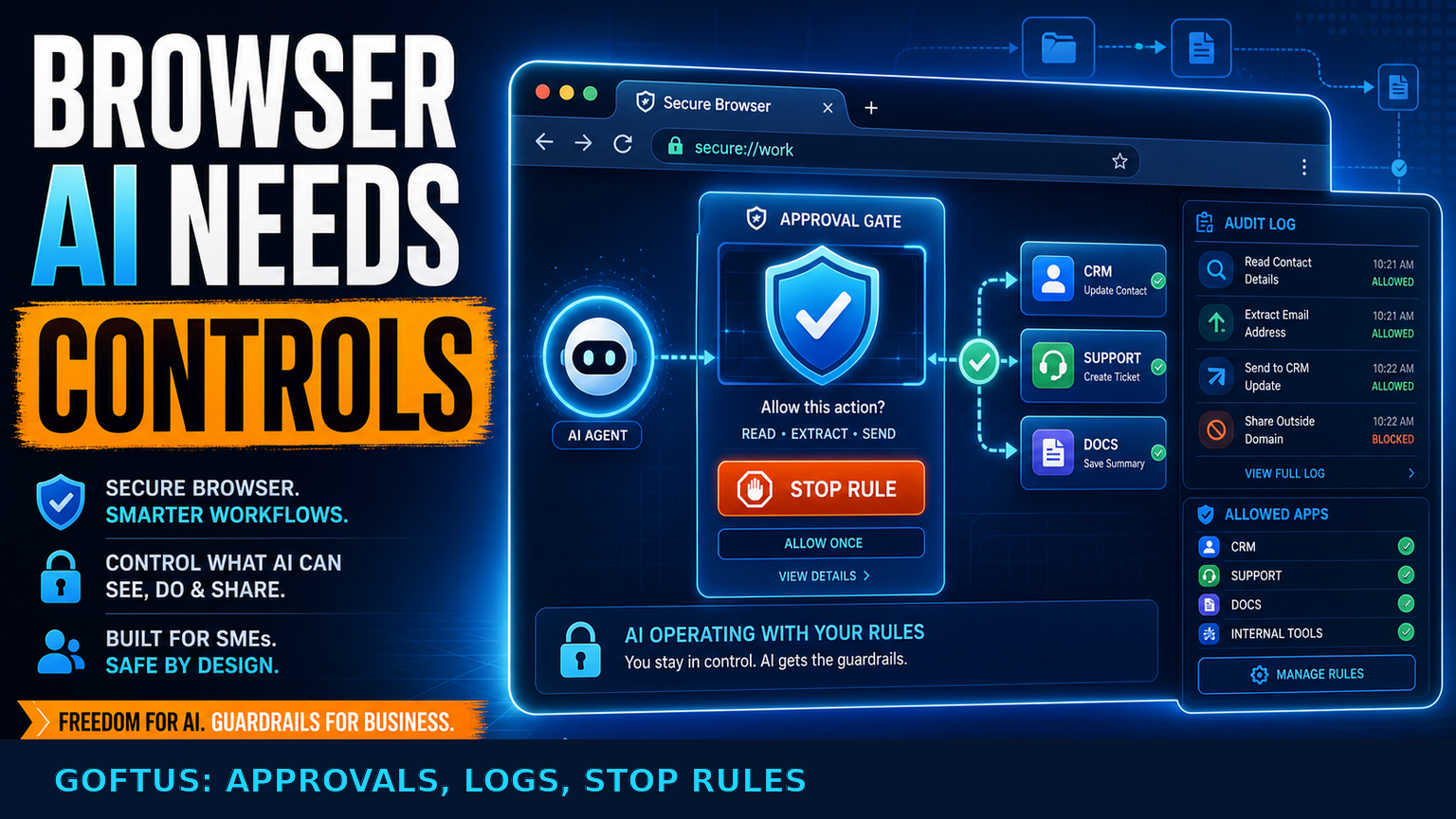
# Prisma Browser Shows Browser With AI Controls Is Becoming an SME Workflow Issue # Quick answer Palo Alto Networks is positioning Prisma Browser as a secure browser built for the AI era, with controls for GenAI usage,
Prisma Browser Shows Browser With AI Controls Is Becoming an SME Workflow Issue
Quick answer
Palo Alto Networks is positioning Prisma Browser as a secure browser built for the AI era, with controls for GenAI usage, SaaS access, BYOD, contractors and evasive threats. For SMEs in the UK, US and Europe, the important signal is not only browser security. It is that more AI work is moving into the browser, where staff log in, read customer records, update CRMs, send support replies, download documents and submit forms.
That makes the search query "browser with ai controls" practical, not futuristic. A browser AI agent can save time only if the business defines what the agent may see, what it may click, when a human must approve the next action, and how every decision is logged. GOFTUS links this topic to /agents and /services because browser automation is safest when it is part of a designed workflow, not a loose tool sitting on an employee laptop.
What this means for SMEs
Most SMEs already run operations through browser tabs. Sales teams live in CRM. Support teams live in ticketing portals. Finance teams use accounting dashboards. Operations teams copy data between supplier portals, spreadsheets and email. If AI agents start helping inside those tabs, the browser becomes a control point for the whole company.
The Palo Alto Networks source describes Prisma Browser as a secure workspace for the AI era, including GenAI governance and protection across SaaS, BYOD and contractors. Reddit search RSS also showed developer and operator interest in browser agents and reusable browser automation tasks. The combined signal is clear enough for SMEs: browser automation is moving from experimental scraping toward governed work.
Hajikreena's view is that SMEs should not wait for a perfect all-in-one platform before setting rules. The first useful step is a small, named workflow. For example, an AI browser agent can open a support dashboard, read a new ticket, identify the customer account, draft a response, update the CRM and route exceptions to a person. That workflow needs five controls before it goes live: allowed websites, allowed data fields, approval points, audit logs and stop rules.
Without those controls, browser automation can become risky very quickly. A helpful agent might submit a form too early, copy private data into the wrong system, download an unnecessary document, or take an action that a manager expected to approve. The issue is rarely that the AI is evil. The issue is that the workflow around the AI was never designed.
GOFTUS treats browser-based workflow automation as an operating system problem. The question is not "which agent can use a browser?" The question is "which business outcome should this browser workflow produce, and who owns each exception?" That changes the project from a demo into an accountable process.
What SMEs should do next
Start with a browser task that happens every week and creates visible friction. Good candidates include checking lead forms, updating CRM records, extracting invoice details, summarising support tickets, collecting supplier order status, preparing compliance documents, or reconciling information between two SaaS tools.
Then write the control map before building automation. List the websites involved. List the fields the agent is allowed to read. Mark which actions can be performed automatically and which require human approval. Decide where screenshots, logs or action summaries should be stored. Decide what happens when the page layout changes, a login challenge appears, a customer asks something sensitive, or the agent confidence is low.
This is where GOFTUS connects /agents with /services. An AI agent is useful only when it is joined to CRM automation, support triage, document automation, reporting and follow-up workflows. The agent may do the browser work, but the business still needs routing, monitoring, permissions and monthly improvement.
A simple pilot should avoid broad autonomy. Do not begin with "let AI run the browser." Begin with "let AI prepare this browser action and ask before submitting." That gives the team confidence, creates evidence for managers and reduces the chance that automation breaks a customer-facing process.
Competitor lens
Faculty AI, Deeper Insights, Waracle and Brainpool AI can help larger UK organisations plan AI programmes. LeewayHertz, Markovate, SoluLab and BairesDev often bring engineering capacity. Addepto, STX Next, Netguru and 10Clouds can support European build projects. SaaS tools such as Zapier, n8n, Relevance AI, Lindy, Gumloop, Bardeen, Make and Stack AI can also automate useful pieces of work.
The SME gap is usually between task automation and workflow ownership. A browser agent might click buttons. A workflow system decides whether the button should be clicked, who approves it, what evidence is saved and what happens when it fails.
Tools automate tasks. GOFTUS automates the workflow around the task. That means designing the control layer around browser AI: narrow workflows, approval gates, login boundaries, exception routing, CRM handoffs, support notes, reporting and improvement cycles. The tool still matters, but the workflow decides whether the result is safe enough to use.
Summery for SMEs
Browser with ai controls is becoming a serious SME operations topic because more work happens inside SaaS browser tabs. The Prisma Browser signal shows that vendors are now treating AI-era browser security as a business issue, not only an IT issue.
SMEs should respond with practical governance. Pick one repetitive browser workflow. Define what the AI can read, do and share. Add a human approval gate before risky actions. Log the output. Review failures every month. Connect the result into CRM, support, document or reporting systems rather than leaving it as a standalone browser trick.
For GOFTUS clients, this is a natural extension of AI automation and AI agents. The goal is not to replace staff with a browser bot. The goal is to remove repeated copying, reduce missed follow-ups and make sure every browser action has a clear owner.
FAQ
What is browser with ai controls for a small business?
It means using AI to help with browser-based work while setting clear limits. The AI might read a ticket, draft an update or prepare a CRM change, but the business decides which sites are allowed, what data can be used, when a person approves the action and where the log is stored. GOFTUS links this to /agents because safe browser agents need workflow rules before they click.
Why not just use a normal browser automation tool?
Normal browser automation can be useful, but it often follows fixed steps. AI browser agents can adapt to changing pages and messy text, which is powerful and risky. SMEs need approvals, stop rules and exception handling so the agent does not submit forms, share data or update records without the right guardrails. GOFTUS designs this through /services as a workflow project.
Where should an SME start with AI browser controls?
Start with one narrow process that staff already repeat, such as checking website leads, updating support tickets or copying supplier order status into a spreadsheet. Keep the first version human-approved. Let the AI prepare the work, then ask before acting. Once logs show the process is reliable, expand carefully into more steps or connect it to CRM, reporting or support automation.
Source notes
Primary source: Palo Alto Networks Prisma Browser product page, retrieved directly, describing a secure browser for the AI era with GenAI governance, SaaS, BYOD and contractor protection. X signal was unavailable because xurl is not installed in this cron environment.