Microsoft 365 Offboarding Needs an Approval Workflow Before Access Is Removed
A practical guide for SMEs that need Microsoft 365 offboarding to protect files, mailboxes, CRM handoffs, and audit evidence before access changes.
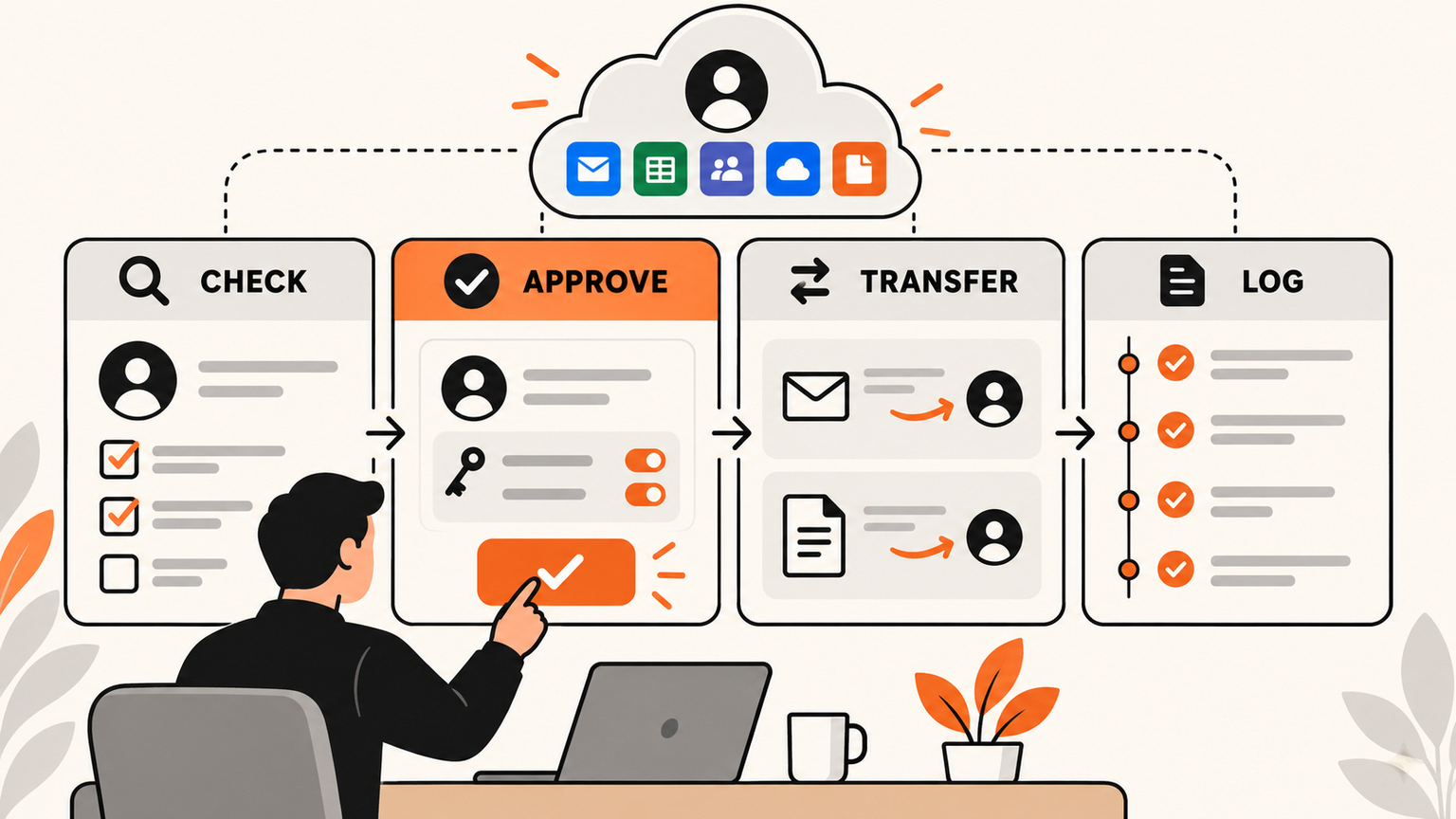
## Quick answer Microsoft 365 offboarding should be treated as an approval workflow because disabling access is only one step in protecting customer data, files, mailbox ownership, CRM context, and audit evidence. When
Quick answer
Microsoft 365 offboarding should be treated as an approval workflow because disabling access is only one step in protecting customer data, files, mailbox ownership, CRM context, and audit evidence.
When a team member leaves, many businesses still rely on a checklist in someone's head. An admin disables the account, forwards email if they remember, moves a few files if someone asks, and hopes nothing important is trapped in a private OneDrive folder. That may feel fine when the company is small, but it becomes risky as soon as sales, support, finance, and operations depend on shared systems.
The better approach is not to make Microsoft 365 more complicated. It is to turn offboarding into a governed workflow with a clear owner, approval gate, transfer steps, exception log, and final review. This is exactly where GOFTUS positions automation: not as a blind bot that clicks every admin button, but as a workflow layer that prepares the right actions, asks a human to approve sensitive changes, then records what happened.
What this means for SMEs
A small business does not need enterprise bureaucracy to offboard people safely. It needs a repeatable path that answers five practical questions before access is removed.
First, what must be protected immediately? That includes account sign-in, active sessions, shared mailboxes, app passwords, API tokens, and external tools where the person used the same business identity.
Second, what work is still live? A sales rep might own open deals, a support agent might own unresolved tickets, and an operations manager might own supplier emails or approval documents.
Third, who receives the handoff? Offboarding is not complete because access is blocked. It is complete when the next owner has the mailbox, files, CRM notes, support history, current tasks, and escalation path needed to continue the work.
Fourth, which steps require human approval? Disabling sign-in can be urgent. Deleting data, changing ownership, exporting files, forwarding email, or letting an agent act in a browser should require review. A simple approval workflow separates emergency access control from slower business-continuity decisions.
Fifth, where is the proof? SMEs often discover the gap during a dispute, audit, customer complaint, or security review. A useful workflow records the trigger, approver, actions prepared, actions approved, actions rejected, systems touched, files transferred, and final owner.
A practical Microsoft 365 offboarding workflow
A GOFTUS-style offboarding workflow can start with a staff-change form or HR ticket. The form captures the departing user, manager, leaving date, urgency, business function, systems used, and whether the exit is routine or sensitive.
The workflow then creates an offboarding case with clear lanes. The observe lane gathers context without changing anything. It checks group membership, mailbox ownership, OneDrive sharing, calendar ownership, Teams channels, CRM owner fields, support queues, document folders, and browser-based admin systems connected to the role.
The prepare lane drafts suggested actions. It might recommend blocking sign-in at a specific time, revoking sessions, assigning mailbox access to a manager, transferring important files, reassigning open CRM opportunities, moving support tickets to a queue, and creating a customer follow-up task. AI can help summarize the case, but it should not take destructive action on its own.
The approve lane is where the business stays in control. A manager approves customer and project handoffs. IT approves identity and access changes. Finance approves billing or supplier portal changes. Legal or leadership approves sensitive exits. Each approval is explicit, not implied by someone forwarding a message.
The act lane performs approved steps through APIs or controlled browser automation. For example, the workflow can prepare a Microsoft 365 admin action, update a CRM owner, create a support handoff note, and open a browser-controlled step for a system that does not have a clean API. If the browser step involves submitting a change, GOFTUS would put a human approval gate before the final click.
The review lane confirms that the user cannot access systems, the new owner has the right files and records, active work has been reassigned, and the audit log is stored. This creates an operating habit rather than a one-off IT scramble.
Where AI helps without taking over
AI is useful in offboarding when it reduces search, summarization, and routing work. It can identify likely handoff items from tickets, documents, CRM notes, emails, and project records. It can draft a handoff summary for a manager. It can flag unusual access, missing ownership, duplicated tasks, and gaps in the record.
But the action boundary is important. AI should not decide that a customer mailbox can be deleted, that a finance folder can be transferred, or that a browser admin form can be submitted. The right pattern is prepare, explain, request approval, then act only inside approved boundaries.
That is why the GOFTUS /agents approach focuses on controlled agents, not unattended scripts. The agent can help the operator see what needs to happen. The business still owns the decision. For deeper workflow design, the /services page is the better next step because it turns one painful admin process into a governed operating system for approvals, logs, handoffs, and review.
Competitor lens
A SaaS checklist tool can be helpful if the process is simple. A consultant can also write a policy or build a one-time automation. The problem is that offboarding sits across identity, email, files, CRM, support, documents, and sometimes browser-only systems. A narrow checklist rarely owns the full handoff.
GOFTUS is different because the work is designed around operational ownership. The workflow is mapped first, then automation is added around the decision points. That means the business can keep using Microsoft 365, its CRM, its support desk, and its existing tools while adding approval gates and evidence around the risky steps.
This is also safer than letting staff build disconnected AI helpers for each department. One agent that summarizes emails, another that edits CRM records, and another that clicks through admin portals can create hidden risk if nobody owns the complete workflow. The offboarding case should be the source of truth. Every helper should report back into it.
Summery for SMEs
Do not treat Microsoft 365 offboarding as a single admin action. Treat it as a controlled workflow that protects access, transfers work, routes customer context, and proves what changed.
The first useful version can be small. Pick one role, such as sales or support. List every system that person touches. Decide which steps are emergency actions, which steps need a manager, which steps need IT, and which steps need a final audit check.
If the process touches CRM records, customer support, finance files, or web admin portals, add approval gates before any AI agent changes data or submits actions. That is how SMEs get the benefit of automation without losing control over identity, files, customers, or evidence.
GOFTUS can help turn this into a practical workflow diagnostic, then build the first version with controlled agents, browser boundaries, and clear review steps. Start with /contact if offboarding is already causing delays, risk, or repeated manual checking.
FAQ
Should a small business automate Microsoft 365 offboarding?
Yes, but the first goal should be consistency, not speed. Automate the intake, reminders, handoff summaries, ownership checks, and audit log. Keep human approval before account deletion, file transfer, mailbox forwarding, CRM ownership changes, or browser-submitted admin actions.
Where should AI fit into an offboarding workflow?
AI should prepare context, find likely handoff items, draft summaries, and flag missing steps. It should not silently remove access, delete content, forward sensitive email, or submit admin changes without approval. The safest workflow lets AI prepare the work while managers and IT approve the action.
Source notes
Microsoft Learn provides administrator guidance for deleting users in Microsoft 365, and Microsoft Entra guidance covers revoking user access. GOFTUS uses those platform steps as inputs to a broader workflow-control pattern for SMEs.
Sources: https://learn.microsoft.com/en-us/microsoft-365/admin/add-users/delete-a-user?view=o365-worldwide and https://learn.microsoft.com/en-us/entra/identity/users/users-revoke-access