Just-in-Time Access Is the Missing Control for SME AI Agents
IBM's just-in-time access explainer shows why SME AI agents need temporary permissions, approval gates, audit logs, and clear workflow ownership.
# Just-in-Time Access Is the Missing Control for SME AI Agents Meta description: IBM's just-in-time access explainer shows why SME AI agents need temporary permissions, approvals, logs, and workflow ownership. IBM publ
Just-in-Time Access Is the Missing Control for SME AI Agents
Meta description: IBM's just-in-time access explainer shows why SME AI agents need temporary permissions, approvals, logs, and workflow ownership.
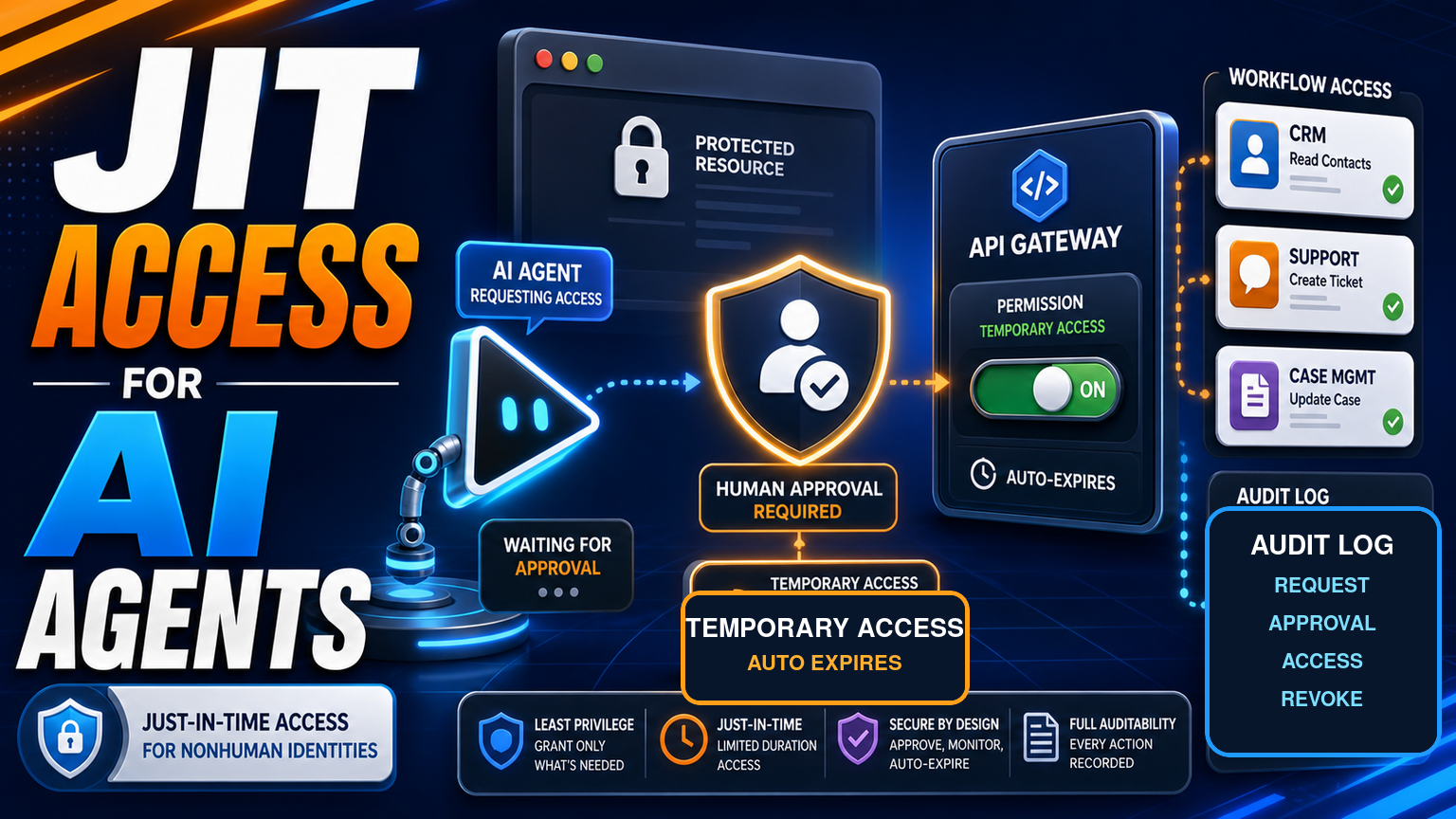
IBM published a fresh explainer on just-in-time access on 27 July 2026, defining it as an identity security model that grants human and nonhuman identities permissions only when needed, for a limited time, with privileges revoked when the task is done. For SMEs exploring AI agents, that wording matters because an agent is not just another chatbot. It may read dashboards, open browser portals, draft support updates, trigger CRM changes, or request data from internal tools.
The business lesson is simple. If an AI agent can act, it should not hold permanent access. It should request narrow access for a defined job, wait for approval where risk is high, leave an audit trail, and lose that access when the job is complete. That is exactly where GOFTUS connects AI agents, workflow automation, and practical SME controls.
Hacker News discussion this week included developer posts about AI agents with Gmail access and credential-gateway tools that keep secrets away from agents. Reddit search RSS was blocked during this run, so this post treats Reddit as unavailable rather than inventing a thread. The pattern is still clear: operators want agent help, but they also want boundaries.
What this means for SMEs
Most SME automation mistakes do not start with the model. They start with access. A team connects an assistant to inboxes, CRM, ticketing, accounting, documents, supplier portals, or browser sessions because the demo looks useful. The assistant then has broader access than the actual workflow needs. Even if the model behaves well most of the time, one bad prompt, wrong file, confused instruction, or compromised account can turn convenience into an operational risk.
Just-in-time access gives business owners a better frame. Instead of asking whether AI is safe in general, ask what the agent needs for this specific task, who approves it, how long the permission lasts, what gets logged, and what happens if the agent reaches an unknown screen or unusual customer request.
For example, a sales follow-up agent may need to read a lead record, draft an email, and update a next-action field. It should not need export access to the whole CRM. A support triage agent may classify a ticket, suggest an answer, and route a refund request to a person. It should not be able to approve refunds alone. A browser automation agent may fill a supplier portal form. It should pause before submit, upload, delete, payment, contract, or irreversible account changes.
This is why browser with AI controls and just-in-time permissions belong together. Browser agents are useful when APIs do not exist, but they need login boundaries, allowed domains, field-level stop rules, screenshots or event logs, and human-approved browser actions. Without those controls, an SME only has a faster way to make mistakes.
Thirumurugan's view
Thirumurugan's view is that AI agent security should be designed around the workflow, not bolted on after the agent is already connected.
A practical AI agent build starts with a narrow process map. What starts the work? Which systems are involved? Which data can the agent read? Which fields can it update? Which step needs human approval? Which exceptions should stop the run? Which logs will prove what happened later?
That may sound less exciting than launching a general agent across every tool, but it is the difference between a demo and a dependable operating system. SMEs do not need an autonomous employee with standing admin rights. They need small, measurable agentic workflows that ask before acting, expire access automatically, and hand uncertain cases to the right person.
GOFTUS builds this kind of control layer before scaling the automation. The agent can still save time, but the business keeps ownership of permissions, approvals, and improvement.
The market already gives SMEs plenty of options. Zapier, Make, n8n, Bardeen, Gumloop, Lindy, Relevance AI, and Stack AI can connect tools and trigger actions. Consultants such as Faculty AI, Deeper Insights, Waracle, Brainpool AI, LeewayHertz, Markovate, SoluLab, BairesDev, Addepto, STX Next, Netguru, and 10Clouds can all help with larger AI programmes.
Those options can be useful. The gap is often the workflow around the task. A connector can move data. An agent platform can call a tool. A consulting project can design a model or integration. But an SME still needs operating rules: who owns the workflow, what the agent can touch, what waits for approval, what is logged, how exceptions are reviewed, and how the process improves each month.
Tools automate tasks. GOFTUS automates the workflow around the task. That means the access model, approval path, fallback queue, CRM or support handoff, reporting view, and review cadence are part of the build, not an afterthought.
What SMEs should do next
Start with one workflow where agent access would clearly save time but risk must be controlled. Good candidates are CRM follow-up, inbox triage, support routing, document checking, supplier portal updates, and internal reporting.
Write down the safe read actions, the safe draft actions, and the actions that need explicit human approval. Separate routine access from privileged access. Add time limits for sensitive permissions. Keep a log that a manager can understand without reading raw system events. Review the failed or paused runs every month, because those are the signals that show where the workflow needs clearer rules.
If the work happens inside a browser, use a controlled browser-agent pattern: allowed sites, login boundaries, approved buttons, blocked downloads, no unattended payment or contract steps, and a visible stop rule. If the work touches documents, support tickets, or CRM records, connect the agent to the smallest useful permission set.
GOFTUS can help SMEs turn this into a practical build through AI agents, automation services, or a short workflow diagnostic. The goal is not to slow teams down. The goal is to let AI act where it is safe, ask where it is risky, and prove what happened.
Just-in-time access is a useful operating principle for AI agents because it treats both humans and nonhuman identities as permission holders that should only get what they need, when they need it. For SMEs, this turns AI-agent adoption from a trust gamble into a controlled workflow design exercise.
Give agents narrow permissions, approve risky steps, expire access after the task, and keep readable logs. Then connect those controls to the business outcome: faster follow-up, cleaner support triage, safer browser automation, and fewer manual handoffs.
Is just-in-time access only for large enterprises? No. The same principle helps smaller businesses avoid permanent over-permissioned agents.
Does this stop AI agents from being useful? No. It gives them a safe lane, clear approvals, and a way to scale once the process is proven.
Where should an SME start? Start with one workflow, such as CRM follow-up or support triage, then add permissions only around that workflow.
Reddit search RSS returned 403, so Reddit was treated as unavailable rather than used as evidence.