IT Operations Automation for SMEs: Control Staff AI Requests Before They Become Support Noise
IT operations automation gives SMEs a safer way to route staff AI requests, support tickets, approvals, and audit logs.
# IT Operations Automation for SMEs: Control Staff AI Requests Before They Become Support Noise **Meta description:** IT operations automation helps SMEs route staff AI requests, support tickets, approvals, and audit lo
IT Operations Automation for SMEs: Control Staff AI Requests Before They Become Support Noise
Meta description: IT operations automation helps SMEs route staff AI requests, support tickets, approvals, and audit logs before tool experiments become noise.
IT operations automation helps SMEs turn noisy staff technology requests into visible intake, routing, approval, and review workflows. Treat those Reddit items as operator sentiment, not verified market proof. They point to a practical business problem: when staff start asking for AI tools, browser extensions, copilots, data access, and quick fixes, the support burden often lands on a small IT or operations team.
The direct Reddit and RSS signals line up around the same lesson for UK, US, and EU SMEs: AI adoption is becoming an operations issue, not only a software buying issue.
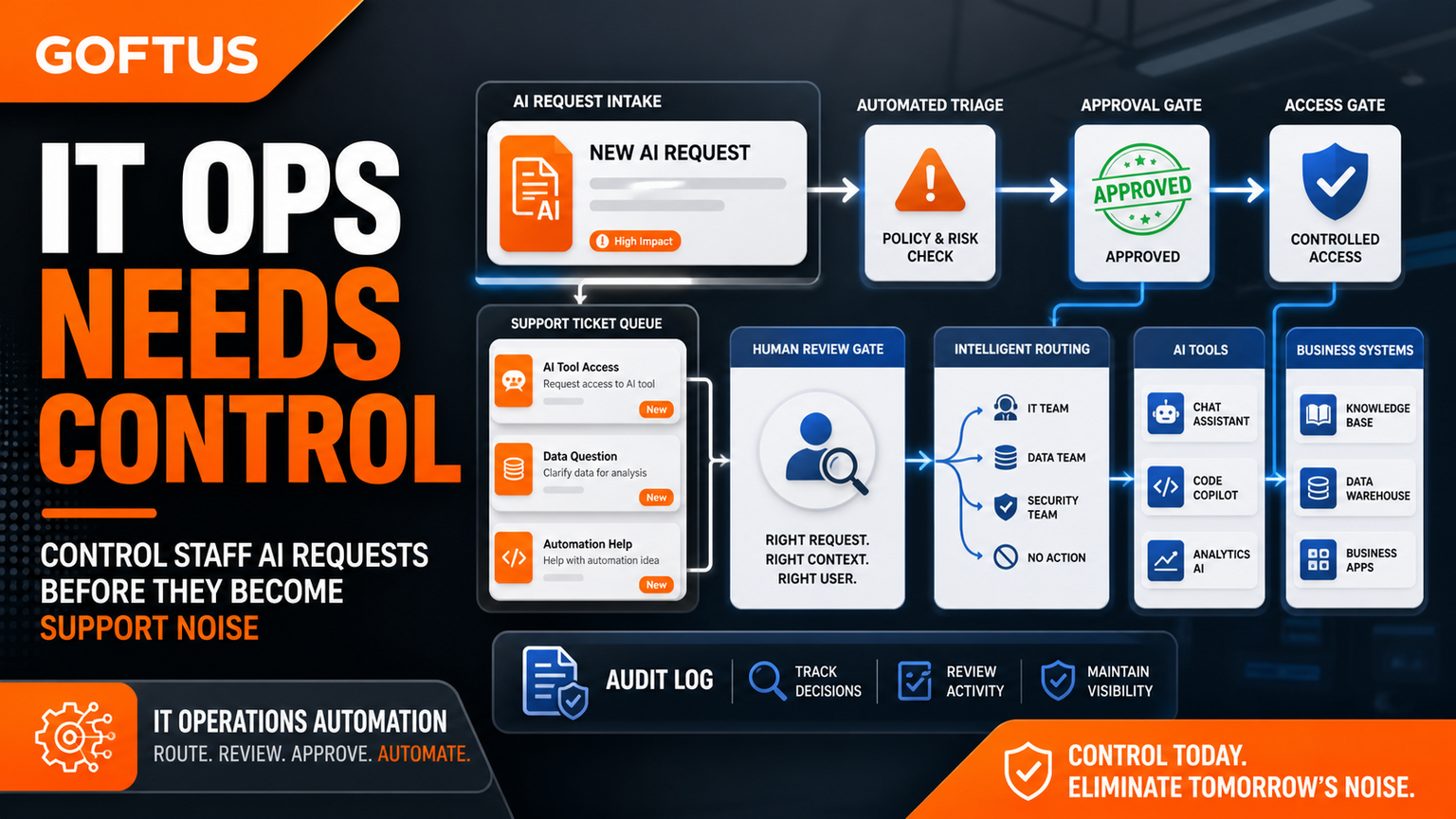
GOFTUS would not solve this by adding another ticketing tool alone. The better starting point is a controlled workflow: request intake, triage, risk check, human approval, implementation, and audit trail. If staff AI requests are already landing in Slack, Teams, email, or informal chats, map the first workflow through /services before the noise becomes normal.
What this means for SMEs
Small businesses rarely have a large IT governance team. A founder, office manager, managed service provider, finance lead, or technical employee may become the default owner for every new AI request. One person wants ChatGPT for customer replies. Another wants an AI note taker in meetings. A sales person wants a browser agent to fill forms. A support person wants AI to summarize tickets. None of these requests are automatically bad, but they should not all be handled as one-off favors.
The operational risk is not just data leakage. It is loss of context. Nobody knows who approved the tool, what data it can touch, which workflow it supports, when it should stop, or how success will be measured. The same support channel fills with repeated questions: can I use this tool, can it access this account, can it write to CRM, can it email customers, can it use a browser, can it store files?
IT operations automation gives that noise a shape. Every request enters the same intake lane. Low-risk requests get standard guidance. Medium-risk requests get a reviewer and a usage boundary. High-risk requests that touch CRM, support, finance, documents, browser sessions, or customer communication get an approval workflow before action. That is where GOFTUS connects automation to real business outcomes: fewer repeated support messages, clearer ownership, safer AI use, and better follow-up.
Thirumurugan's view
The mistake SMEs make is treating staff AI enthusiasm as either a cultural problem or a tool-selection problem. It is usually a workflow-design problem. If the workflow is missing, every new AI tool creates another exception. If the workflow exists, the business can say yes more safely because the request has a path.
A useful first version can be simple. Create an AI request form or shared intake channel. Classify requests by workflow, not by vendor name. Add a short checklist for customer data, login access, browser actions, document changes, and system updates. Decide which requests can be approved by a manager, which need operations review, and which should become a GOFTUS-built automation or AI agent.
This is also where browser with ai controls matters. If an AI assistant only drafts text, a review gate may be enough. If it clicks through a web app, submits forms, updates records, downloads files, or uses live credentials, the business needs stricter controls. GOFTUS can design those boundaries through /agents, but the intake and approval workflow should come first.
SaaS tools like Zapier, n8n, Make, Bardeen, Gumloop, Lindy, Relevance AI, and Stack AI can be useful for automating steps. Consultancies such as Faculty AI, Deeper Insights, Waracle, Brainpool AI, LeewayHertz, Markovate, SoluLab, BairesDev, Addepto, STX Next, Netguru, and 10Clouds can also help teams explore AI projects.
The gap appears when the business needs ownership around the task. Who decides whether an AI tool is allowed? Who reviews risky outputs? Who logs the decision? Who updates the workflow after the first failure? Who connects the request to CRM, support, documents, browser controls, and reporting?
Tools automate tasks. GOFTUS automates the workflow around the task. For IT operations automation, that means intake, approval, routing, fallback, monitoring, and improvement. The deliverable is not a shiny demo. It is a repeatable operating lane that staff can actually use.
What SMEs should do next
Start with the last ten staff AI or IT support requests. Group them into categories: drafting, research, customer support, CRM, documents, browser work, data access, reporting, and account permissions. Mark which ones can be answered with guidance, which need a human reviewer, and which should be turned into a controlled automation.
Then choose one workflow with repeated demand. For many SMEs this is AI tool approval, support triage, customer reply drafting, CRM follow-up, or document handling. Define the owner, trigger, allowed data, approval point, exception path, and success metric. If browser actions are involved, include login boundaries, action limits, audit logs, and stop rules.
GOFTUS can turn that map into a practical workflow system through /services. If the request should become an AI agent, use /agents after the controls are clear. The £100 Startup Kit diagnostic is a useful starting point when the team knows there is noise but has not yet mapped the workflow.
Staff AI requests are becoming part of IT operations. The answer is not to approve everything, ban everything, or push every question into a busy support channel. SMEs need a simple automation layer that captures requests, routes them by risk, adds approval where needed, logs decisions, and connects the result to the right business workflow.
What is IT operations automation for staff AI requests? It is a workflow that captures, classifies, approves, routes, and logs staff technology or AI requests before they create unmanaged support noise.
Should SMEs let staff use AI tools? Often yes, but use safe lanes. Drafting and research can be lighter. Customer data, CRM, finance, documents, and browser actions need review.
Where should GOFTUS fit? GOFTUS designs the workflow around the request, then builds the automation, agent, dashboard, or handoff that makes it repeatable.