Customer Support Automation: How ChatGPT Should Hand Off Work Before Customers Wait
A practical guide for using ChatGPT in customer support automation with approval gates, CRM ownership, escalation rules, and audit logs before AI replies.
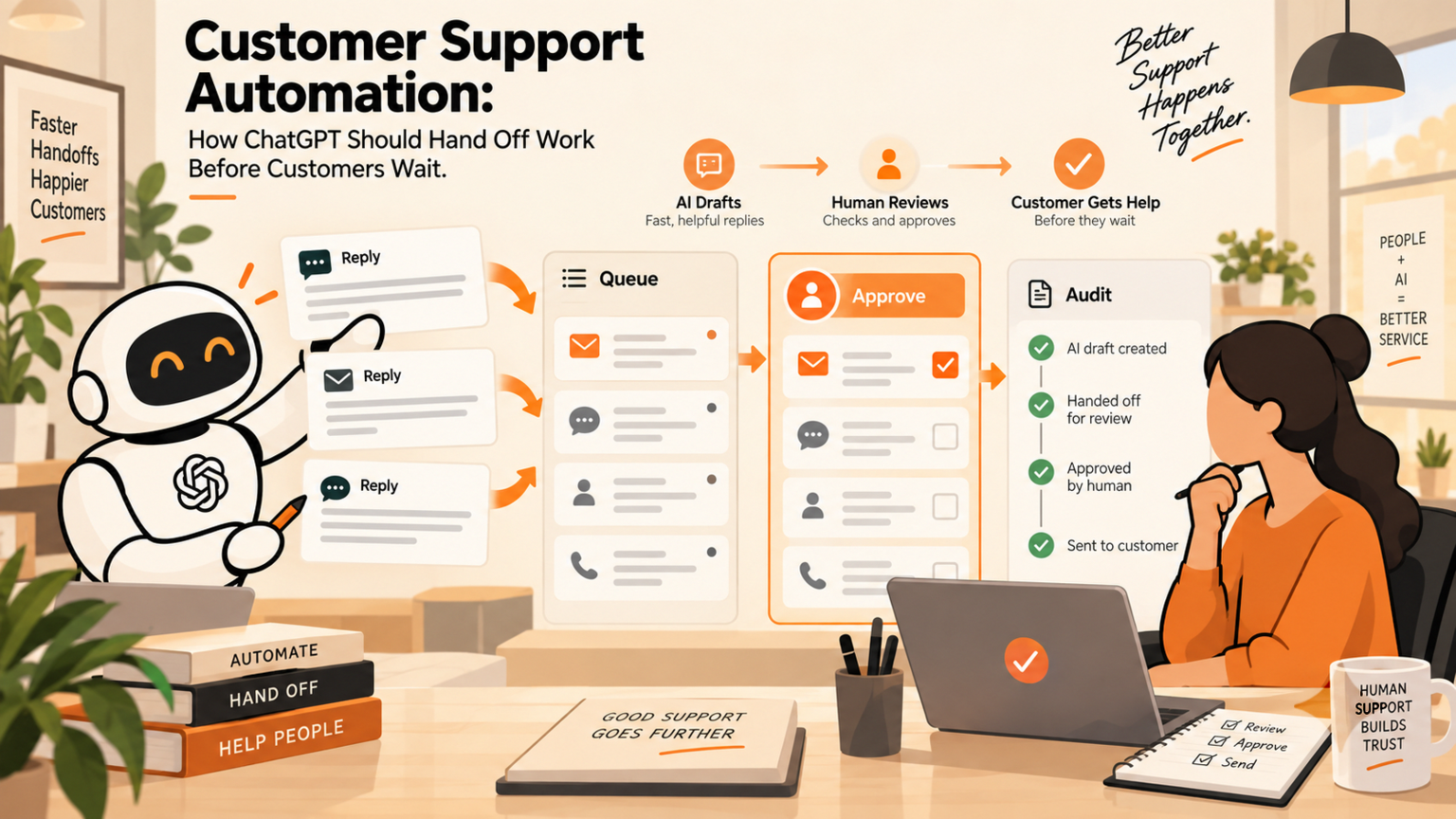
Customer support automation works best when ChatGPT prepares answers, routes context, and suggests next steps while humans approve anything that changes a customer promise, refund, contract, account, or CRM record. For support leads and founders, the risk is not that AI drafts a reply. The risk is that a fast reply becomes an unowned action. GOFTUS designs human-approved AI automation so the support queue moves faster, customers wait less, and the business keeps approval workflows, audit logs, and clear escalation paths. OpenAI says business users retain ownership and control over business data, and that its business products include enterprise controls and governance.[1][2] Those controls still need to be translated into a working support process.
Quick answer
Customer support automation should use ChatGPT for triage, summarisation, suggested replies, CRM notes, and follow-up preparation. It should not let AI independently promise refunds, change contract terms, close complaints, update sensitive records, or submit actions in business systems without a named approval gate. A safe first workflow is observe, prepare, approve, act, and review: AI reads the support context, drafts the next step, a human approves risky actions, the system records what happened, and the workflow improves from logged exceptions.
What is customer support automation with ChatGPT?
Customer support automation with ChatGPT means placing AI inside the support workflow rather than asking staff to paste tickets into a standalone chatbot. The workflow can read a support message, identify the request type, pull recent CRM context, draft a response, suggest a knowledge-base answer, create a follow-up task, and prepare an escalation note.
The important word is workflow. A prompt gives one answer. A workflow decides what happens before and after that answer: what data ChatGPT can see, when review is needed, where notes are stored, and who owns the result.
For an SME, this matters because a support reply can affect renewals, refunds, account access, delivery promises, sales follow-up, and customer trust. GOFTUS treats ChatGPT as a preparation layer, not an unsupervised support agent.
When should a business use ChatGPT in support?
Use ChatGPT when the queue has repeatable questions, slow first responses, inconsistent CRM notes, missed follow-ups, or staff spending too much time turning long customer messages into useful next steps. It is useful for summarising tickets, grouping similar issues, drafting replies from approved knowledge, and preparing handoffs between sales, support, and operations.
Do not start with the riskiest support action. Start with the smallest workflow where speed and consistency matter but a human can still review the output. Good starting points include password-reset guidance, order-status summaries, appointment follow-up, onboarding questions, FAQ replies, complaint classification, and internal escalation notes.
If the support issue touches payment, cancellation, legal commitments, regulated data, account changes, or angry customers, ChatGPT can prepare the work, but a person should approve the customer-facing action.
Practical checklist before AI replies to customers
Before putting ChatGPT into customer support automation, check these points:
Define the support categories AI may handle and the categories it must escalate.
Name the owner who approves refunds, contract changes, exceptions, complaints, and sensitive records.
Connect only the data the workflow needs, such as approved FAQs, CRM notes, order status, or policy documents.
Keep an audit log of the customer message, AI draft, human approval, final reply, and follow-up task.
Set tone rules so replies sound like the company, not a generic chatbot.
Add stop rules for uncertainty, missing data, frustrated customers, and high-value accounts.
Review failed or edited drafts each week to improve the workflow.
Link support automation to CRM ownership so sales and operations can see the handoff.
This checklist is also a useful first diagnostic. If a business cannot name the approval owner or source of truth, it is not ready for fully automated replies. It may still be ready for AI-assisted triage and internal notes.
Workflow example: support ticket to approved handoff
Imagine a customer asks why onboarding has stalled. A manual team might read the email, search the CRM, ask operations for context, draft a reply, and forget to create a follow-up task. ChatGPT can help, but only if the process is designed around ownership.
A safer workflow looks like this:
1. The ticket arrives and is classified as onboarding delay.
2. ChatGPT summarises the customer concern and pulls approved CRM context.
3. The workflow drafts a response that explains the next step without inventing a promise.
4. If the reply includes timing, refund language, or a contract commitment, it goes to a human approver.
5. After approval, the reply is sent and a CRM follow-up task is created.
6. The audit log stores the original ticket, AI draft, approver, final reply, and task ID.
That is customer support automation with control. The customer gets a faster answer, the team keeps context, and the business can prove what happened.
Common mistakes SMEs make
The first mistake is treating ChatGPT as a replacement for support ownership. AI can draft and route, but someone still owns policy, exceptions, tone, and customer promises.
The second mistake is connecting too much data too soon. A narrow workflow with approved sources is easier to secure, measure, and improve than a broad assistant connected to every system.
The third mistake is skipping CRM handoff. A customer reply that never creates a follow-up task can still fail the customer. The workflow should update the right record or prepare a reviewed update for a person to approve.
The fourth mistake is measuring only reply speed. The real business result is fewer missed handoffs, clearer ownership, better escalation, and less repeated admin.
Internal CTA: start with one support workflow
If your team is considering ChatGPT for customer support automation, do not begin with a full support bot. Start with one workflow diagnostic. GOFTUS can map the trigger, source data, approval gate, CRM handoff, audit log, and improvement loop through /services, /agents, or /contact.
The best first project is usually a support triage or follow-up workflow: AI prepares the work, humans approve risky steps, and the system keeps evidence.
Summery for SMEs
ChatGPT can make support faster, but only when it sits inside a governed workflow. Use it to summarise, classify, draft, and prepare handoffs. Keep humans in the loop for customer promises, sensitive records, refunds, contracts, and escalations. The business value comes from quicker support plus approval workflows, audit logs, and clear CRM ownership.
FAQ
Can ChatGPT automate customer support for SMEs?
Yes, but it should begin with controlled tasks such as triage, summaries, suggested replies, FAQ drafts, CRM notes, and follow-up preparation. Full autonomy should wait until the business has approval rules, audit logs, escalation paths, and a clear owner for customer-impacting actions.
What should humans approve in customer support automation?
Humans should approve refunds, sensitive account changes, legal or contract language, complaints, high-value customer replies, cancellations, and any response that makes a promise the business must keep. AI can prepare these actions, but approval protects trust and accountability.
How does customer support automation connect to CRM?
The workflow should write or prepare CRM notes, create follow-up tasks, and preserve context from the customer conversation. Without CRM ownership, an AI-written reply may look fast while the real follow-up is still missed.
What is the safest first ChatGPT support workflow?
Start with internal triage or response drafting for common questions. Let ChatGPT classify the request, summarise context, draft the answer from approved sources, and send risky replies to a person before anything reaches the customer.
When should GOFTUS help with customer support automation?
Use GOFTUS when support automation touches CRM, follow-up tasks, sensitive customer records, browser-controlled tools, document workflows, or approval gates. GOFTUS designs the workflow around approval, logs, and handoffs before AI acts.
Sources
[1] https://openai.com/enterprise-privacy
[2] https://openai.com/business/