ChatGPT Workflow Automation Needs a Follow-Up Plan, Not Another Prompt Library
ChatGPT becomes useful for business when prompts turn into approved tasks, owner handoffs, CRM updates, support follow-ups, and measured outcomes.
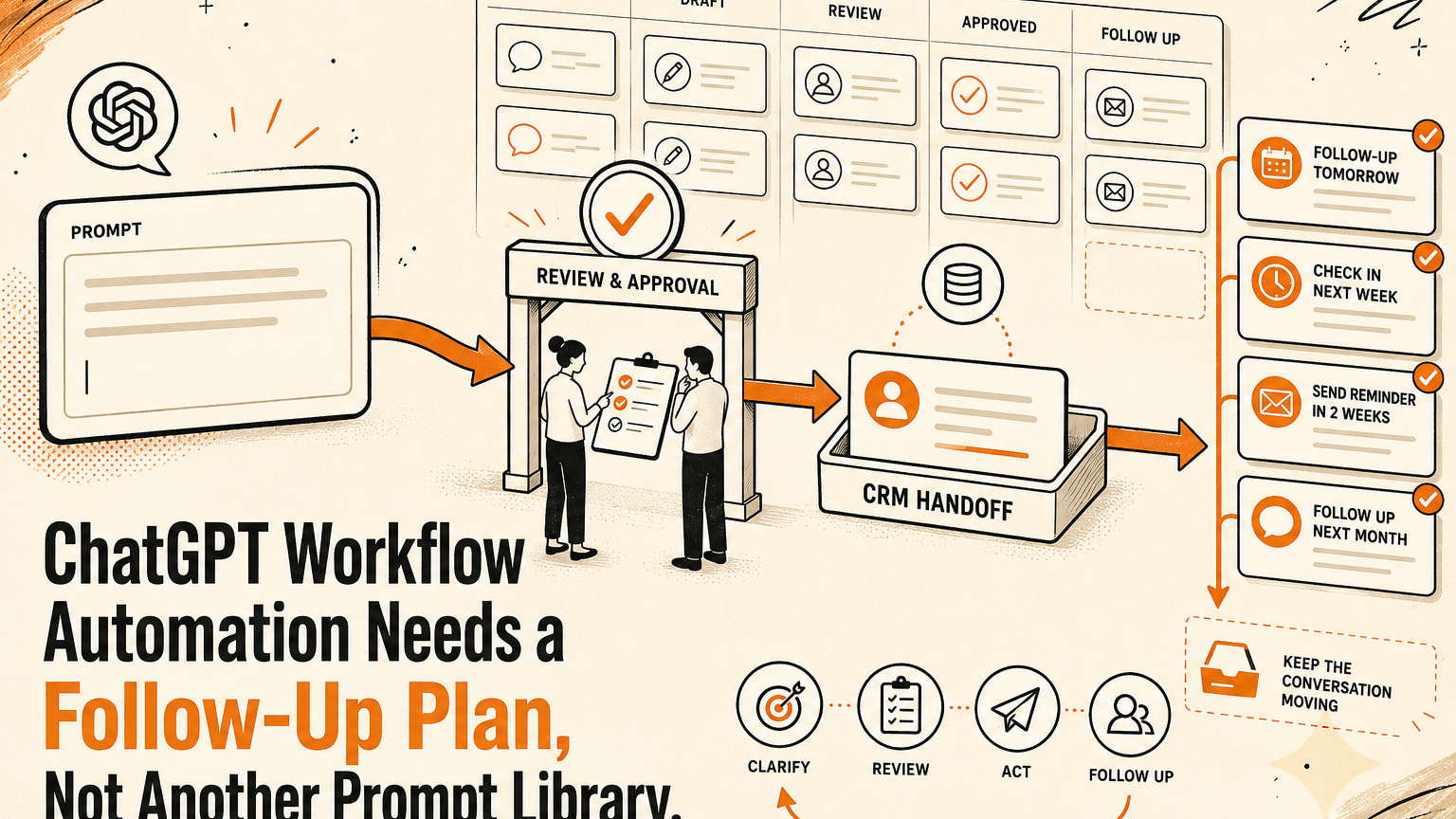
## Quick answer ChatGPT workflow automation works best when every useful answer is routed into a clear follow-up plan with owners, approval steps, logs, and the right handoff into CRM, support, or operations systems. Ma
Quick answer
ChatGPT workflow automation works best when every useful answer is routed into a clear follow-up plan with owners, approval steps, logs, and the right handoff into CRM, support, or operations systems.
Many small teams already use ChatGPT every day. The problem is not lack of prompts. The problem is that a good answer often dies in the chat window. A sales reply gets drafted but never logged. A support answer sounds right but nobody checks whether it matches policy. A marketing idea looks useful but does not become a brief, task, or approved asset.
For GOFTUS clients, the practical goal is simple: turn AI output into a governed business process that people trust enough to use every week.
Why prompt libraries are not enough
Prompt libraries can help a team standardise how staff ask for first drafts, summaries, and research. They are useful training wheels. But they rarely solve the operating problem.
A prompt can ask ChatGPT to draft a follow-up email. It cannot decide which lead stage should change in the CRM, whether a discount needs manager approval, whether a support promise is allowed, or whether the customer record has enough context. A prompt can summarise a complaint. It cannot guarantee the right person sees the escalation before the customer goes cold.
This is why many teams feel busy with AI but see limited operational lift. Staff copy output from one place to another. Managers review work in scattered messages. Useful customer context stays trapped in chats. The business becomes faster at creating text, but not always faster at closing loops.
Better automation treats ChatGPT as one step in a workflow, not the workflow itself.
What this means for SMEs
For an SME, ChatGPT workflow automation should usually begin with a narrow, repeatable workstream. Good candidates include inbound lead triage, customer support replies, meeting follow-ups, invoice query handling, internal knowledge answers, and post-sale check-ins.
Take inbound leads as an example. A website form arrives with a vague request. ChatGPT can classify the request, draft a short reply, suggest a next action, and summarise the opportunity. That still leaves several important steps. The CRM needs a clean note. The owner needs a task. The reply may need approval before it is sent. If the buyer asks about price, scope, or sensitive data, the workflow needs an escalation route rather than a confident guess.
A governed version is simple to understand:
1. Capture the request from the website, inbox, or form.
2. Let ChatGPT prepare a summary, draft, and recommended next step.
3. Route the output through a human review gate.
4. Update the CRM, support desk, or task system after approval.
5. Log the decision, the owner, and the next follow-up date.
6. Review exceptions weekly so the workflow improves.
The first workflow to build
A strong first ChatGPT automation is usually a follow-up workflow, because follow-up is where revenue and trust leak quietly. It is also easy to scope.
Start with one entry point: contact form enquiries, support emails, booked-call notes, abandoned quote requests, or post-sale questions. Define the acceptable AI role. For example, ChatGPT may summarise the request, draft a reply, identify missing information, and recommend a follow-up category. It should not send refunds, change prices, promise delivery dates, or close a ticket without review.
Then define approval lanes. Green items can be low-risk drafts that staff approve quickly. Amber items need a manager or specialist because money, policy, legal wording, or customer frustration is involved. Red items stop the workflow and create an escalation task.
GOFTUS usually recommends mapping this before adding more AI tools. The workflow map tells you which parts can be automated, which parts need approval, and which parts should stay human. If you want help mapping that first process, start with the GOFTUS workflow diagnostic at /contact.
Competitor lens
No-code workflow builders, helpdesk AI features, CRM assistants, and standalone ChatGPT workspaces can all be useful. The weakness is rarely the tool itself. The weakness is ownership.
A SaaS tool may give you a trigger, a form, or a chatbot. A consultant may give you prompts. A generic agent builder may give you connectors. But a working business process still needs rules, review points, error handling, security boundaries, and someone accountable for improvement.
This is where GOFTUS takes a different view. The question is not whether ChatGPT can draft the email. It can. The question is whether the business has a reliable path from draft to approved action, customer record, follow-up task, and measurable outcome.
That difference matters when the workflow touches money, customer trust, staff workload, or live systems. Automation should reduce handoff risk, not hide it.
Practical workflow examples
A sales leader could use ChatGPT to turn call notes into a clean CRM summary, next-step email, and renewal-risk flag. The workflow should require human approval before the CRM stage changes or the email sends.
A support leader could use ChatGPT to propose answers to repeated questions. The workflow should compare the draft against approved knowledge, route uncertain cases to a person, and log which answers led to resolution.
A marketing leader could use ChatGPT to draft campaign briefs from customer questions. The workflow should check claims, assign a reviewer, and move approved ideas into the content calendar rather than leaving them in chat history.
An operator could use ChatGPT to summarise supplier emails and create follow-up tasks. The workflow should preserve the original message, mark the owner, and flag any request involving price, contract terms, or delivery risk.
Summery for SMEs
ChatGPT can create useful drafts, summaries, and recommendations, but value appears when those outputs move through a controlled follow-up process. SMEs should choose one repeatable workflow, define what AI may prepare, add clear approval lanes, connect the result to CRM or support systems, and review exceptions every week.
If your team is already using ChatGPT but still relies on copy-paste, scattered review, and memory-based follow-up, the next step is not another prompt pack. It is a workflow diagnostic. GOFTUS can help you map the first automation, decide what needs approval, and build the handoff into /services, /agents, or a focused diagnostic conversation at /contact.
FAQ
Should ChatGPT send customer replies automatically?
Usually not at first. Let it prepare replies, summaries, and next steps, then put approval rules around anything that affects money, commitments, customer trust, or account status.
What is the easiest ChatGPT workflow automation to start with?
Start with follow-up. Website enquiries, support questions, meeting notes, and quote requests all benefit from summaries, draft replies, CRM notes, owner assignment, and due dates.
How do you measure whether ChatGPT automation is working?
Track response time, follow-up completion, reopened tickets, missed tasks, approved drafts, rejected drafts, and manager exceptions. The best workflows show what changed, not only how much text was generated.
Where should a business put approval gates?
Put gates before sending customer messages, changing CRM stages, updating records, creating refunds, publishing content, or letting an agent act inside browser-based tools.