Browser With AI Controls for SMEs: Safe AI Agents in Web Apps
Browser with AI controls helps SMEs automate web apps safely with approvals, audit logs, login boundaries, and human review before action.
# Browser With AI Controls for SMEs: Safe AI Agents in Web Apps **Meta description:** Browser with AI controls helps SMEs automate web apps safely with approvals, audit logs, login boundaries, and human review before ac
Browser With AI Controls for SMEs: Safe AI Agents in Web Apps
Meta description: Browser with AI controls helps SMEs automate web apps safely with approvals, audit logs, login boundaries, and human review before action today.
Browser with AI controls is the practical way to let AI agents work inside web apps without giving them a blank cheque over customer data, forms, downloads, logins, or business records. For UK, US, and EU SMEs, the buyer problem is simple: teams want AI to help with browser-based work, but the business still needs approvals, audit logs, login boundaries, and stop rules before an agent clicks submit.
The fresh news trigger is SecurityBrief Australia's report that Google has outlined Chrome Enterprise security controls for AI agents in the browser. The article frames the browser as a core workplace environment because agents increasingly move across SaaS tools, internal documents, and public websites.
GOFTUS turns that signal into a practical workflow design problem. If an AI agent can open pages, read customer context, fill forms, copy data, update CRM, or trigger support actions, it needs the same discipline as a junior operator with access to live systems. Start with the GOFTUS /agents path if you want browser agents designed around human approval rather than uncontrolled autonomy.
What this means for SMEs
Browser work is where many useful business automations live. Sales teams copy lead details into CRM. Support teams check order pages, helpdesk tickets, and knowledge bases. Finance teams download invoices or submit supplier forms. Operations teams move between dashboards that do not have clean APIs. AI browser agents make those jobs tempting to automate because they can see and act inside the same pages employees already use.
That convenience is also the risk. A normal API integration has predictable endpoints, permissions, and logs. A browser agent may see whatever the logged-in employee can see. It can misread a page, click the wrong button, submit a form early, or download private data. The business risk is the missing workflow boundary between suggestion and action.
SMEs should separate browser automation into three lanes. The first lane is read-only assistance. The agent can summarise a page, extract non-sensitive fields, compare records, or prepare a draft. The second lane is human-approved action. The agent can fill a form, prepare a CRM update, or stage a support reply, but a named person reviews before submit. The third lane is restricted action. Payments, refunds, account access changes, legal statements, security settings, and bulk customer updates should stay behind explicit approval or remain manual until the process is proven.
The same structure applies whether the tool is a browser extension, a SaaS automation platform, a Claude or ChatGPT workflow, n8n, Make, Bardeen, Gumloop, Relevance AI, Lindy, or a custom GOFTUS agent. The tool matters, but the workflow around the tool matters more.
Thirumurugan's view
Thirumurugan's view is that AI browser agents should be treated like operational staff, not magic scripts. You would not let a new employee submit orders, alter customer records, change billing details, and email customers on day one without training, supervision, and a record of what happened. An AI agent deserves the same boundaries.
The practical starting point is one narrow workflow. Choose something repetitive but contained, such as checking new website enquiries, preparing CRM notes, gathering order status details, or drafting replies from approved FAQ content. Map the workflow step by step. Mark which steps are read-only, which steps create a draft, and which steps require approval. Then add logging before expanding scope.
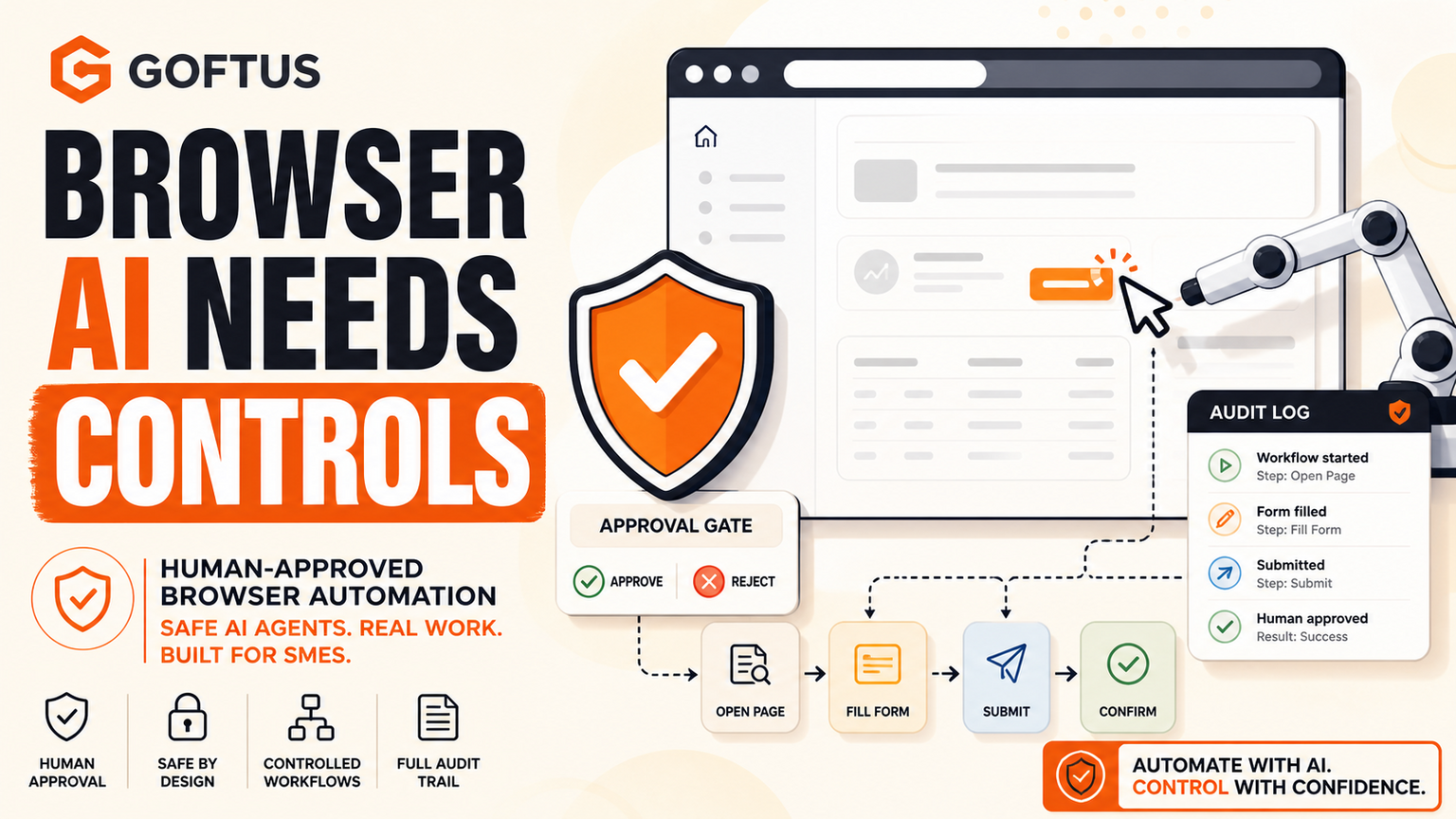
A useful browser with AI controls setup normally includes allow-listed domains, role-based access, action logs, human approval for submit buttons, data redaction rules, and exception routing. It should also include a rollback plan so the team can catch mistakes, correct records, and improve the workflow rule.
The competitor market gives SMEs many valid options. UK firms such as Faculty AI, Deeper Insights, Waracle, and Brainpool AI can help with AI strategy. US providers such as LeewayHertz, Markovate, SoluLab, and BairesDev can deliver custom agent projects. European teams such as Addepto, STX Next, Netguru, and 10Clouds support engineering-heavy automation. SaaS tools such as Zapier, n8n, Relevance AI, Lindy, Gumloop, Bardeen, Make, and Stack AI can automate many browser-adjacent tasks quickly.
The gap appears after the first demo. A browser agent that works once still needs ownership, review, monitoring, change control, and measurable outcomes. Tools automate tasks. GOFTUS automates the workflow around the task. That means GOFTUS focuses on the operating layer: access, approvals, CRM or support handoffs, exception review, and monthly improvement.
For SMEs, this is often the difference between a clever experiment and a safe business system.
What SMEs should do next
First, list the browser tasks that waste time but do not require judgement at every step. Good candidates include copying enquiry details, checking public portals, preparing support replies, collecting order status, updating lead records, or comparing document data against a web form.
Second, mark the risk level for each step. Reading a page is different from editing a field. Filling a form is different from submitting it. Preparing a customer reply is different from sending it.
Third, design approval gates before the first live rollout. Use human review for submit, send, delete, refund, publish, payment, access change, and bulk update actions. Keep logs that show the page, proposed action, reviewer, and outcome.
Fourth, connect the agent to the rest of the business workflow. Browser automation should hand off to CRM, support, documents, reporting, and management review. If you want this designed as a working system rather than a risky experiment, use the GOFTUS /agents page or /services page to scope one controlled browser workflow.
AI agents are moving into the browser because that is where real business work happens. The opportunity is faster admin, better follow-up, and fewer manual copy-paste tasks. The risk is uncontrolled action inside logged-in business systems. Browser with AI controls gives SMEs a safer path: narrow workflows, human approval, access boundaries, logs, stop rules, and regular improvement.
What is browser with AI controls for SMEs?
Browser with AI controls means an AI agent can help with web-based work while the business keeps approval gates, access rules, and audit logs around each action. It is useful when teams need automation across portals, CRM screens, helpdesks, or websites that do not have clean APIs.
When should an AI browser agent ask for human approval?
It should ask before submit, send, delete, refund, publish, pay, change access, or update customer records in bulk. A good rule is simple: AI can prepare the action, but a human approves anything that changes a live business system or customer outcome.
How can GOFTUS help with AI browser controls?
GOFTUS designs the workflow around the browser agent: allowed sites, action lanes, approval steps, exception routing, CRM or support handoffs, and review logs. The goal is not just to automate clicks. It is to make browser-based workflow automation safe enough for real SME operations.