AI Tools for Business: The Workflow Diagnostic Before You Buy Another Subscription
Before buying another AI tool, use a workflow diagnostic to check ownership, approvals, data access, audit logs, and ROI proof for safer automation.
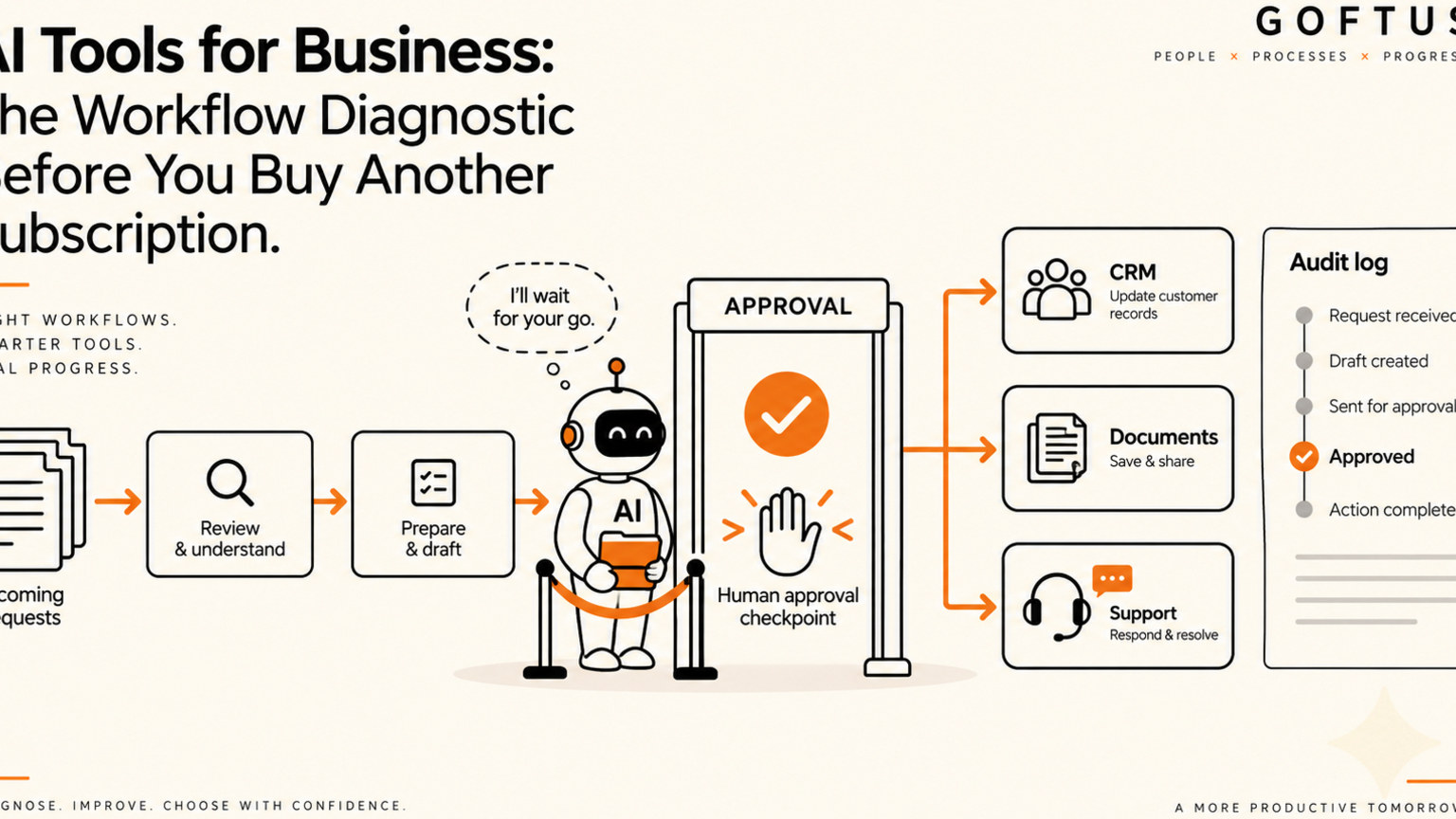
AI tools for business should be chosen after a workflow diagnostic, not after a demo, because the diagnostic shows where approval, data access, audit logs, ownership, and ROI proof are needed before another subscription enters daily work. For founders, operators, support leads, sales leaders, and technical teams, the risk is subscription sprawl. One team buys a writing tool, another tests an agent, another tries a support assistant, and no one owns the workflow between them. GOFTUS helps SMEs turn tool interest into human-approved AI automation with clear approval workflows and measurable outcomes.
Quick answer
A workflow diagnostic is a short review of how work actually moves through the business before selecting AI tools. It maps the trigger, data, owner, approval point, exception route, system update, and success measure for one workflow. The result is a safer buying decision: keep the tool if it fits the workflow, reject it if it only adds another login, or use GOFTUS to design a governed automation around the real business process.
What is a workflow diagnostic for AI tools?
A workflow diagnostic is a practical map of one business process from first trigger to final proof. It asks who starts the work, what information is needed, which systems are touched, what a person must approve, what happens when the answer is uncertain, and how the business knows the workflow improved.
This matters because many AI tools look useful in isolation. A chatbot can draft replies. A model can summarise documents. An assistant can prepare CRM notes. A browser-controlled agent can open websites and fill forms. But the business result depends on the handoff between people, systems, approvals, and logs.
Anthropic documents rate limits for API use, including limits that can vary by model and workspace tier.[1] Microsoft says Copilot setup includes license assignment, SharePoint optimization, and secure deployment steps.[2] Those vendor controls are useful, but an SME still needs to decide how each tool fits its own workflow and operating model.
What this means for SMEs
AI tool selection should begin with one painful workflow, not a list of features. Pick the work that already has clear friction: missed follow-ups, slow first replies, inconsistent reports, manual document checks, repeated support questions, delayed approvals, or staff copying information between tools.
Then ask whether the AI tool solves the workflow or only solves one task inside it. A tool that summarises support tickets is helpful. A governed support workflow is stronger because it can read the ticket, prepare the reply, check the knowledge base, flag risk, request human approval, update the CRM, and log what happened.
The best first project is narrow enough to measure and important enough to matter. GOFTUS starts with a workflow diagnostic because it reveals where AI should observe, prepare, approve, act, and review. Read the related customer support automation example.
AI tools for business checklist before you buy
Use this checklist before approving another AI subscription:
Name the workflow, not just the tool category.
Write the first trigger, such as a lead form, support ticket, invoice, email, document upload, or CRM change.
Identify the human owner who approves risky decisions.
List the systems the workflow touches, including CRM, support desk, email, documents, finance tools, and browser portals.
Define what AI may prepare and what it must never send, submit, delete, refund, or change without approval.
Decide where audit logs will record prompts, inputs, approvals, actions, and exceptions.
Set one success measure, such as faster response time, fewer missed follow-ups, cleaner CRM notes, or lower admin time.
Confirm the fallback route when the tool is unavailable, rate-limited, wrong, or uncertain.
If the checklist cannot be answered, the business is not ready to buy. It is ready to diagnose.
Workflow example: from lead enquiry to CRM handoff
Imagine a small services company receiving enquiries from its website. Staff read the message, search past emails, check CRM history, reply manually, create a follow-up task, and sometimes forget to update the opportunity.
An AI tool alone might draft a faster reply. A GOFTUS workflow can classify the enquiry, summarise the buyer need, check CRM history, draft a reply, suggest a follow-up date, and prepare the CRM update. If the request involves pricing, delivery promises, sensitive data, or a custom scope, the workflow pauses for human approval. Once approved, it sends or queues the response, updates the CRM, and records the action.
That is the difference between a tool and a business workflow. The tool creates output. The workflow creates controlled progress.
Common mistakes when choosing AI tools
The first mistake is buying for excitement instead of workflow fit. A strong demo can hide weak handoffs. If the tool cannot connect to the systems where work is finished, staff still have to copy and paste.
The second mistake is treating admin controls as a complete operating model. Settings help, but they do not decide who approves a refund, how exceptions are routed, or which CRM field proves the customer was handled.
The third mistake is skipping logs. If AI prepares or performs business work, leaders need to know what was requested, what data was used, who approved it, what action happened, and what changed afterward.
The fourth mistake is automating the riskiest step first. Start with observe and prepare. Add approve. Only then allow limited actions.
Competitor lens
No-code automation tools, AI assistants, and SaaS platforms can be useful. They are often the right place to test a simple workflow. The gap appears when the business needs cross-system ownership, approval gates, audit trails, browser-controlled actions, and monthly improvement.
GOFTUS sits in that gap. Instead of selling one more login, GOFTUS designs the workflow around the business outcome. See services, agents, and questions.
Internal CTA
Before buying the next AI tool, book a GOFTUS workflow diagnostic through contact. Bring one workflow that feels slow, risky, or repetitive. GOFTUS will help identify what should be automated, what should stay human-approved, and what proof should be logged before the workflow expands.
Summery for SMEs
AI tools for business are worth considering when they improve a named workflow, not when they simply add another feature to the stack. A workflow diagnostic protects the buying decision by showing where approvals, audit logs, fallbacks, data boundaries, and ROI proof belong. For SMEs, the practical move is to diagnose one workflow first, then choose or build the AI layer that fits it.
FAQ
What are AI tools for business?
AI tools for business are software products or agents that help teams draft, summarise, classify, route, analyse, or act on work. They become safer and more valuable when they are placed inside approval workflows with clear owners and logs.
How should a business choose AI tools?
Choose AI tools by mapping the workflow first. Check the trigger, data, system access, approval step, fallback route, and measurable outcome before comparing features or pricing.
When should an SME use a workflow diagnostic?
Use a workflow diagnostic before buying a tool, connecting AI to customer data, allowing agents to update systems, or asking staff to rely on AI for support, sales, documents, reporting, or browser actions.
What is the safest first AI automation project?
The safest first project is usually an observe-and-prepare workflow, such as ticket summarisation, CRM note preparation, document triage, FAQ drafting, or lead-routing recommendations with human approval before external action.
Can GOFTUS work with existing AI tools?
Yes. GOFTUS can design governed workflows around existing tools, custom agents, CRM systems, support desks, documents, and browser-controlled actions so the business gets controlled progress rather than tool sprawl.
Sources
[1] Anthropic API rate limits: https://docs.anthropic.com/en/api/rate-limits
[2] Microsoft 365 Copilot setup guide: https://learn.microsoft.com/en-us/copilot/microsoft-365/microsoft-365-copilot-setup