AI Tools for Business: Approval Gates Before Fast Prototypes Become Technical Debt
AI tools help SMEs move faster when prototypes pass through approval gates, owner checks, audit logs, and maintenance rules before production use.
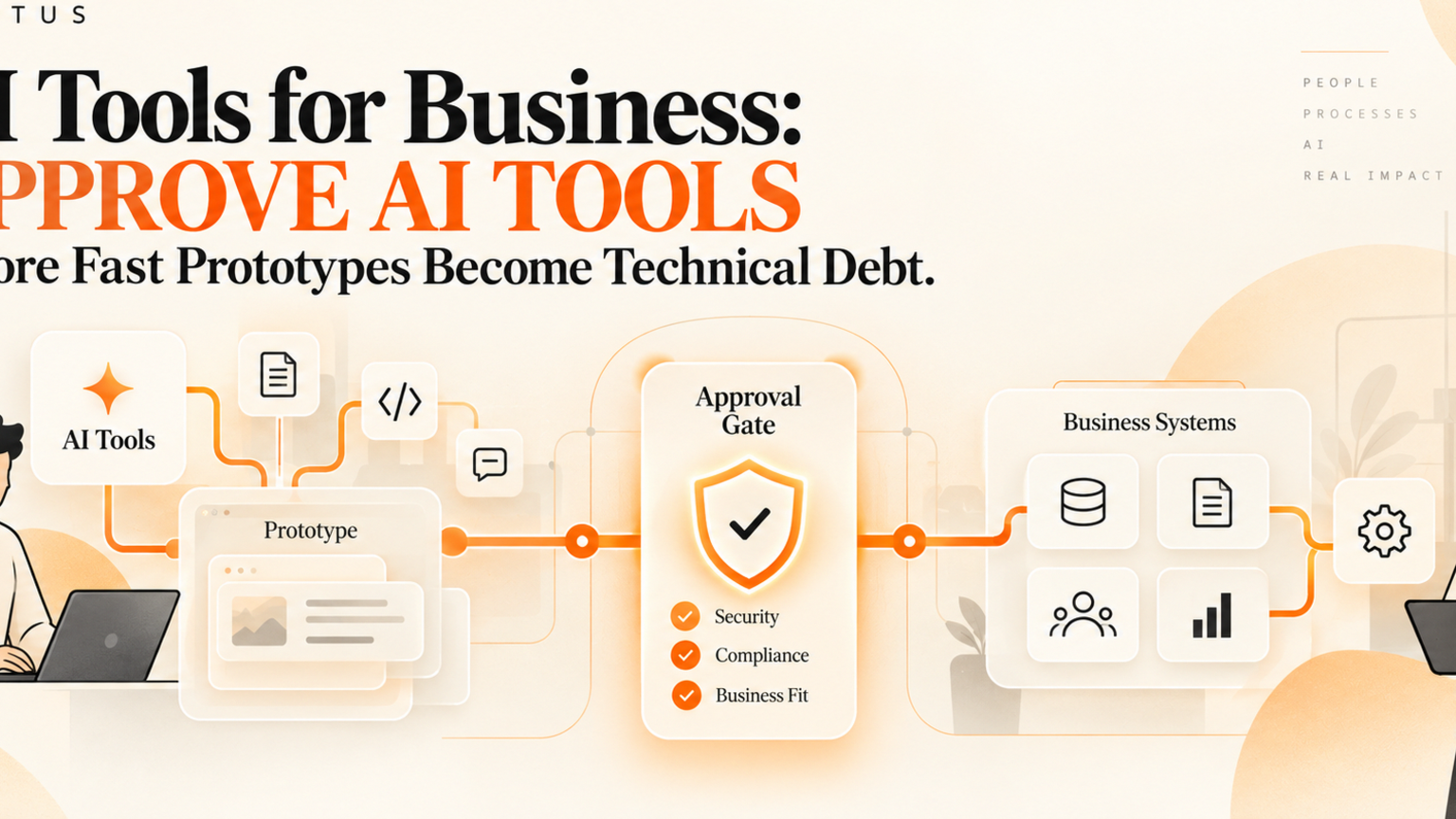
AI tools for business should speed up useful prototypes, not create hidden technical debt that nobody owns. For founders, operators, and technical leads, the safe path is to place approval gates between experiment, production workflow, and customer impact. Fast AI prototypes are useful when they prove a workflow is worth automating. They become risky when a team moves them into daily operations without review, data boundaries, fallback rules, and a named owner.
Quick answer
AI tools create business value when they are tested inside one repeatable workflow, reviewed before they change live systems, and logged after every important action. SMEs should use AI tools to prepare work first, then add approval gates before the tool sends messages, changes records, publishes content, updates code, or touches customer data.
The practical rule is simple: if an AI tool can affect customers, money, access, records, content, or production systems, it needs an owner, a review step, and a rollback path.
What are AI tools for business?
AI tools for business are software systems that help teams write, summarize, classify, analyze, create, code, route, or act on work using artificial intelligence. They can include writing assistants, coding assistants, image tools, chat assistants, workflow agents, support copilots, CRM helpers, and browser-controlled agents.
GitHub describes its Copilot cloud agent as able to research a repository, create implementation plans, make changes on a branch, improve test coverage, update documentation, and address technical debt. That shows how far AI tools have moved from simple suggestions into task execution.
IBM defines technical debt as future costs from shortcuts or suboptimal development decisions, including quick fixes, poor documentation, and outdated code. The same debt pattern now appears in business workflows: a useful prototype gets copied into operations, then nobody knows who owns it, what data it uses, or how to fix it when the process changes.
What this means for SMEs
SMEs should not avoid AI tools. They should stop treating every working demo as a finished workflow.
A demo proves possibility. A governed workflow proves reliability. The difference is ownership. A reliable AI workflow has a business owner, technical owner, approval policy, data boundary, log, and review cadence.
This matters because AI tools often look cheaper than process design. A team can buy another subscription, paste a prompt into a chatbot, or connect an agent to a tool in an afternoon. The cost appears later when customer messages are inconsistent, content has no reviewer, support handoffs are unclear, or a coding assistant produces changes that nobody understands.
NIST says its AI Risk Management Framework is designed to help organizations manage risks from AI products, services, and systems and incorporate trustworthiness considerations into design, development, use, and evaluation. For SMEs, that translates into a practical habit: decide how the workflow will be trusted before it goes live.
Practical workflow example
Imagine a small software company using AI tools to build an internal lead-routing dashboard. The prototype works. It reads a form, summarizes the request, scores urgency, drafts a follow-up, and creates a CRM task.
The risky path is to connect it directly to the CRM and inbox because the demo looked impressive. That creates hidden debt. Who checks the score? Who owns the prompt? What happens when the CRM fields change? Can the AI send a wrong follow-up? Does anyone know which data was used?
The safer path is to split the workflow into lanes. The AI tool prepares the lead summary and recommended next step. The sales owner approves high-value, urgent, or unusual leads. The system writes approved actions to the CRM and logs what changed. A weekly review checks missed leads, response time, and manual overrides.
Approval checklist before an AI tool goes live
Use this checklist before moving an AI prototype into production work:
Name the workflow owner and the technical owner.
Write the business outcome in one sentence.
List every system the tool can read from or write to.
Separate prepare-only steps from actions that change records, send messages, publish content, or modify code.
Define which actions need human approval.
Add stop rules for missing data, high-value customers, complaints, access changes, legal wording, pricing, and unusual requests.
Log inputs, AI recommendations, approvals, final actions, errors, and overrides.
Create a rollback path for bad outputs or broken integrations.
For a first pass, review GOFTUS services at /services, AI agent options at /agents, and the questions library at /questions. If the workflow already touches customers or business systems, use /contact to book a diagnostic before adding more tools.
Common mistakes
The first mistake is confusing speed with readiness. AI tools can draft, code, summarize, and plan quickly, but speed does not prove the output belongs in a live workflow.
The second mistake is skipping documentation. If the team cannot explain what the AI tool reads, changes, and sends for review, the business is building debt.
The third mistake is letting one power user become the hidden owner. If only one person understands the prompt, connector, spreadsheet, or agent runbook, the workflow is fragile.
Competitor lens
Generic AI tools, no-code automation platforms, and coding assistants can all help. They are useful for drafting, prototyping, analysis, and connector work. The gap appears when a business expects the tool vendor to own its workflow quality.
GOFTUS focuses on the layer between tool capability and business reliability. That means mapping the workflow, setting approval gates, defining human review, logging actions, and improving the process after it is live.
A useful comparison is simple: a tool helps produce the work, while a governed workflow decides whether that work should be used, changed, sent, or escalated.
Summery for SMEs
AI tools are best treated as workflow accelerators, not workflow owners. Use them to test, draft, classify, and prepare work. Before they act on customers, content, CRM records, documents, browser sessions, or code, add approval gates, audit logs, stop rules, and a named owner.
If your team already has several AI tools but no shared workflow map, start with one high-friction process and diagnose it before buying another subscription. The GOFTUS approach is to turn the strongest prototype into a human-approved AI automation workflow that can be measured, reviewed, and improved.
FAQ
What are the best AI tools for business?
The best AI tools for business are the ones tied to a clear workflow, owner, approval step, and measurable outcome. A generic top-tools list matters less than whether the tool safely improves support, sales, documents, marketing, operations, or technical delivery.
How can AI tools create technical debt?
AI tools create technical debt when teams ship quick prototypes without documentation, owners, review steps, data boundaries, tests, or logs. The work may look fast at first, but future changes become harder because nobody can explain how the workflow works.
When should an SME add approval gates to AI tools?
Add approval gates when an AI tool can send a message, change a CRM record, publish content, modify code, submit a form, update access, spend money, or influence a customer outcome. Preparation can be automated earlier. Action needs stronger control.
How does GOFTUS help teams choose AI tools?
GOFTUS starts with the workflow diagnostic, not the tool list. We identify the repeatable process, define the risk boundary, choose where AI should prepare work, and add human-approved automation before live actions.
What should an AI tool audit log include?
An audit log should include the original input, data sources, AI recommendation, human approver, final action, timestamp, exception reason, and downstream system update. That gives the business evidence for review, improvement, and accountability.
Source notes
GitHub Copilot cloud agent: https://docs.github.com/en/copilot/concepts/agents/coding-agent/about-coding-agent
IBM technical debt: https://www.ibm.com/think/topics/technical-debt
NIST AI RMF: https://www.nist.gov/itl/ai-risk-management-framework