AI Security for SMEs: Stop Closing Alerts and Build Approval Workflows
AI security for SMEs needs alert triage, approval workflows, logs, and safe automation before alerts become noise, risky action, or customer-facing mistakes.
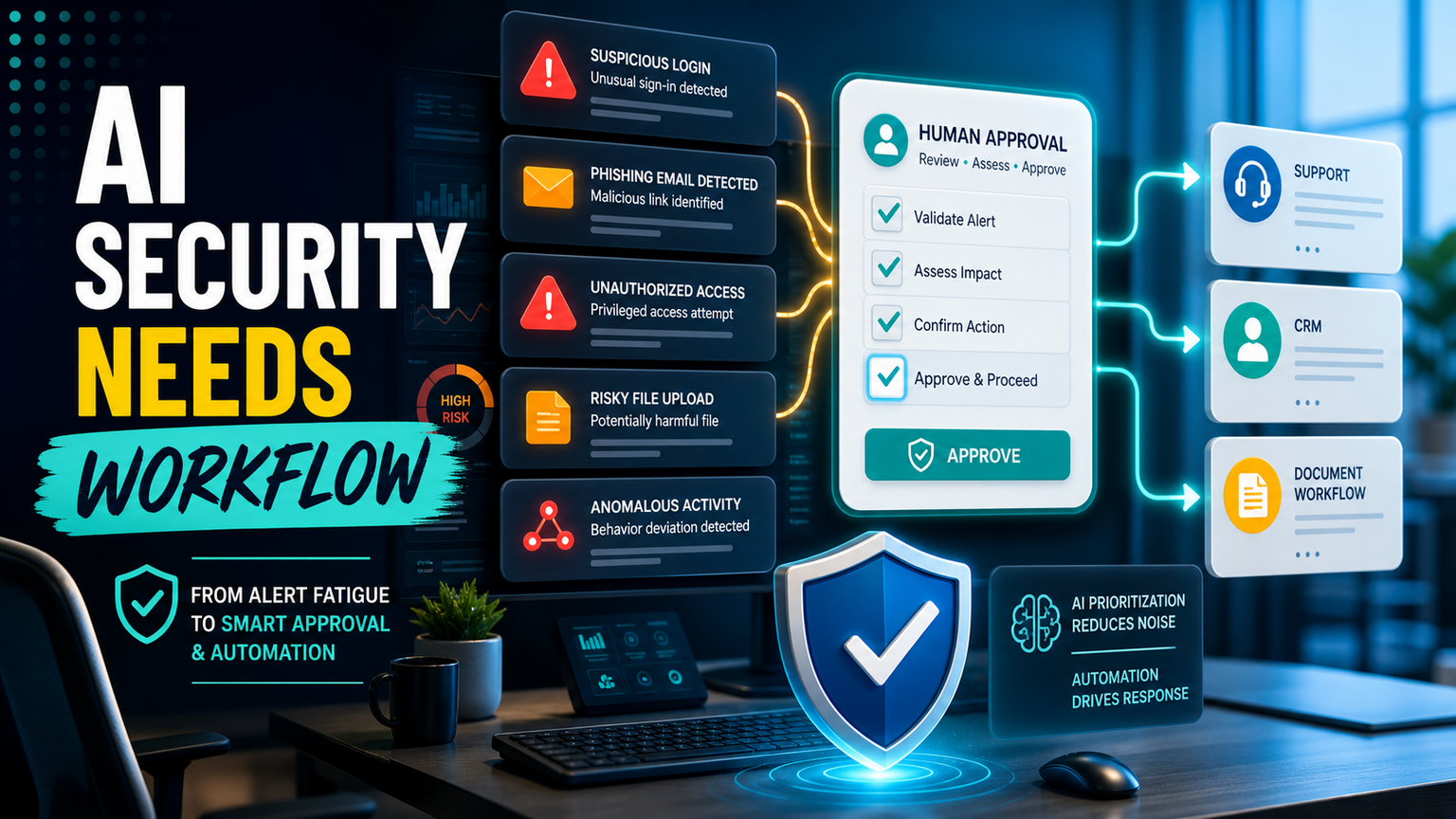
# AI Security for SMEs: Stop Closing Alerts and Build Approval Workflows Meta description: AI security for SMEs needs alert triage, approval workflows, logs, and safe automation before alerts become noise or risky actio
AI Security for SMEs: Stop Closing Alerts and Build Approval Workflows
Meta description: AI security for SMEs needs alert triage, approval workflows, logs, and safe automation before alerts become noise or risky action.
Quick answer
AI security for SMEs is not only about buying another monitoring tool. The urgent operating problem is deciding which alerts matter, who approves the response, what can be automated, and how every action is logged before it touches email, identity, CRM, support, documents, or browser-based admin portals.
The buyer problem is clear: SMEs need AI security workflow automation that turns noisy alerts into owned decisions.
What this means for SMEs
Small businesses rarely fail security because nobody cares. They fail because the alert queue is bigger than the team, the process is unclear, and every tool creates a new inbox. A phishing warning lands in email security. A suspicious login appears in identity. A support ticket hints at account takeover. A file upload looks unusual. A browser portal asks for a risky permission change. Each item may be small, but together they create alert fatigue.
AI can help by summarising alerts, grouping related signals, suggesting next actions, and drafting responses. But AI can also make security messier if it acts without boundaries. If a model closes low-priority alerts too aggressively, opens tickets without context, changes access, or sends customer messages before review, the business has replaced alert fatigue with automation risk.
For SMEs in the UK, US, and Europe, the practical goal is not a giant security operations centre. It is a lean security workflow: collect the signal, classify the risk, assign an owner, require approval for sensitive actions, log the decision, and route the follow-up into the tools staff already use.
Hajikreena's view
Hajikreena's view is that AI security becomes useful when it reduces uncertainty without removing human judgement. A founder, operations manager, outsourced IT partner, or support lead should not have to read every raw alert. They should see a small number of clear decisions: ignore, investigate, ask the user, reset access, escalate, notify a customer, or document a lesson.
That is where GOFTUS designs the workflow around the security task. We can connect existing alerts to approval queues, CRM notes, support tickets, document checklists, and controlled browser actions. We can also define what AI is allowed to prepare versus what a person must approve. A low-risk duplicate alert may be grouped automatically. A customer-facing response, access change, payment-related action, or browser submission should wait for a human approval step.
This makes AI security practical for SMEs. The business keeps speed, but it also keeps accountability.
A practical AI security workflow
Start with one workflow, not every threat at once. A good first workflow might be suspicious logins, phishing reports, risky file uploads, or customer account support tickets. For that workflow, define five parts.
First, define the intake. Which tools generate the alert, and where should it land? Second, define the triage rules. What makes the alert low, medium, or high risk? Third, define the approval lane. Who can approve account resets, customer messages, supplier changes, or browser portal actions? Fourth, define the action lane. Which steps can AI prepare, and which steps can automation complete? Fifth, define the audit trail. Where is the decision stored so the business can review patterns later?
This is where GOFTUS services fit. We are not asking SMEs to rip out security tools. We help them build the workflow layer around those tools so alerts become owned actions instead of background noise.
Competitor lens
Security SaaS, workflow tools, and AI automation platforms all have a place. Zapier, n8n, Make, Bardeen, Gumloop, Lindy, Relevance AI, and Stack AI can move data between systems. Consultancies such as Faculty AI, Deeper Insights, Waracle, Brainpool AI, LeewayHertz, Markovate, SoluLab, BairesDev, Addepto, STX Next, Netguru, and 10Clouds can help with strategy, software, or data projects.
The gap for many SMEs is the operating layer after the alert arrives. Who owns the decision? What is allowed to run automatically? Which action needs approval? Where does the evidence live? What happens next month when the process changes?
Tools automate tasks. GOFTUS automates the workflow around the task. That means mapping the security decision, integrating the handoff, monitoring exceptions, and improving the workflow when real staff use it.
What SMEs should do next
Pick one alert type that currently gets ignored, duplicated, or closed without learning. Write down the current path from alert to decision. Then mark each step as observe, prepare, approve, or act. Observe means AI can read and summarise. Prepare means AI can draft a ticket, message, checklist, or browser action. Approve means a person must review. Act means automation can complete a safe step.
If the workflow touches customer data, money, identity, supplier details, regulated documents, or browser-based admin portals, keep a human approval gate. If it only groups duplicate noise or drafts a summary, automate more freely.
GOFTUS can turn that map into an SME-ready workflow with alerts, approvals, logs, CRM or support handoff, document updates, and controlled agent actions through AI agents where they are appropriate. If you want a focused starting point, the £100 Startup Kit diagnostic can identify one security workflow worth automating before you buy another tool.
Summery for SMEs
AI security is useful when it helps teams decide faster, not when it quietly closes alerts or acts without context. SMEs should use AI to group signals, prepare next steps, and reduce noise, while keeping approvals, logs, and stop rules around sensitive actions. The winning workflow is simple: alert, triage, owner, approval, action, evidence, improvement.
FAQ
Should SMEs use AI to close cybersecurity alerts automatically?
Only for narrow, low-risk duplicates after the business has defined the rule and audit log. Anything involving access, customer data, payments, supplier changes, or external messages should have human approval before action.
Can GOFTUS connect security alerts to CRM or support workflows?
Yes. GOFTUS can route approved security follow-up into CRM notes, support tickets, internal checklists, document workflows, or escalation queues so the alert creates a business action instead of another inbox.
Where do browser with AI controls fit in security workflows?
Browser controls matter when security work touches web portals without clean APIs. GOFTUS can design approval gates, login boundaries, action logs, and stop rules before AI-assisted browser tasks submit forms or change settings.
Source notes
These are treated as operator sentiment, not verified incident evidence. Direct full-article claims were not used where only RSS headlines were accessible.