How SMEs control MCP tools before AI agents connect to business systems
AI governance for MCP tools helps SMEs approve agent actions, control browser work, and log what touches CRM, support, and finance.
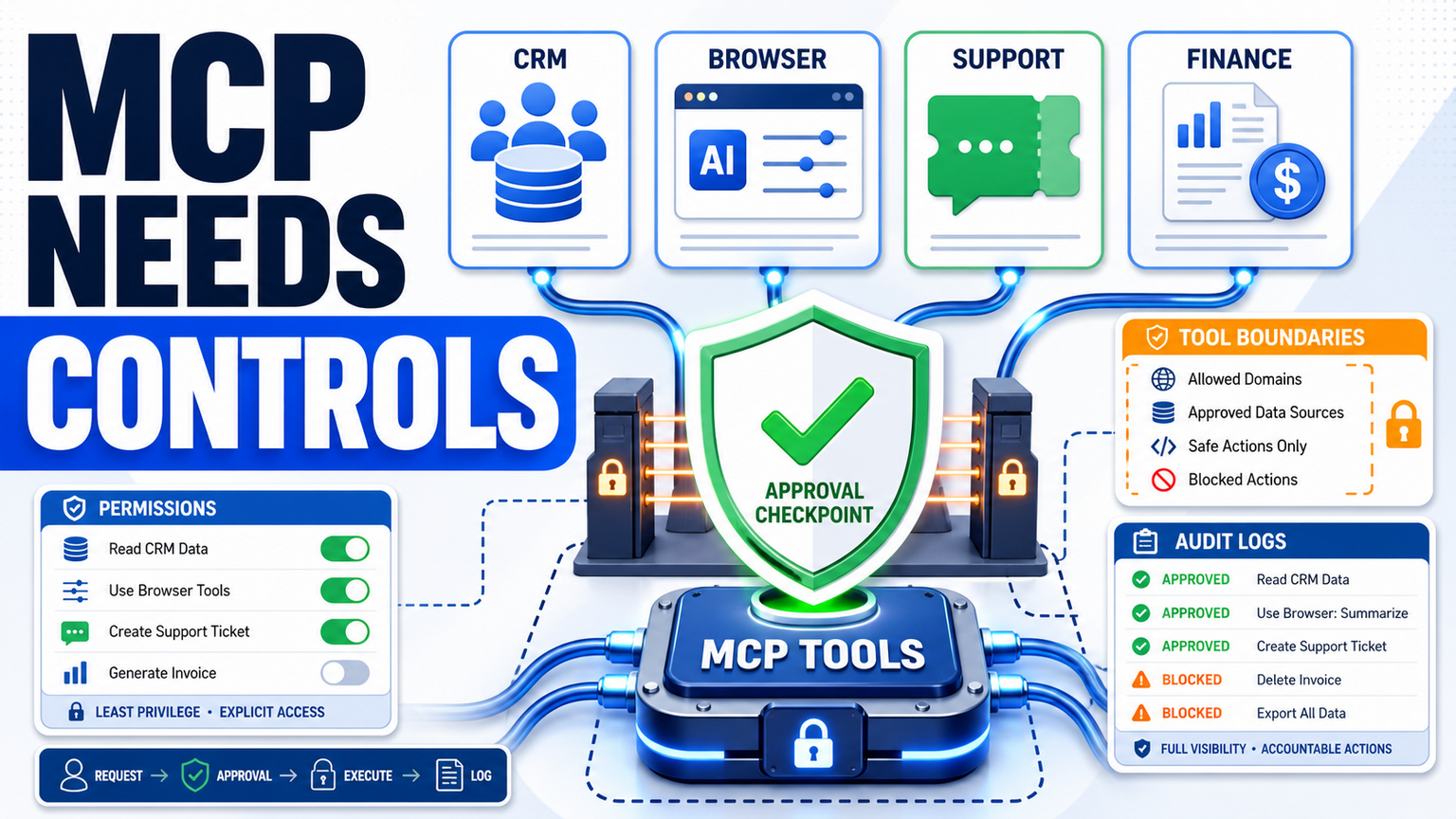
# How SMEs control MCP tools before AI agents connect to business systems **Meta description:** AI governance for MCP tools helps SMEs approve agent actions, control browser work, and log what touches CRM, support, and
How SMEs control MCP tools before AI agents connect to business systems
Meta description: AI governance for MCP tools helps SMEs approve agent actions, control browser work, and log what touches CRM, support, and finance.
AI governance for MCP tools means deciding which systems an AI agent may reach, what it may read, what it may change, and when a person must approve the next step.
For SMEs, the lesson is practical. APIs, browser actions, CRM updates, support tickets, finance tasks, and document workflows are not safe just because an agent can call them. GOFTUS builds AI agent workflows at /agents with approval gates, logs, fallback routes, and human-owned boundaries before automation touches live business systems.
What this means for SMEs
MCP is useful because it gives AI agents a common way to discover and use tools. That can reduce custom integration work. It can also make the risky part easier: connecting an agent to more systems faster than the business has reviewed the workflow.
That is why the buyer problem is not simply "Should we use MCP?" The better question is: "Which actions should an AI agent be allowed to take, and how do we prove the right person approved them?"
A safe SME design separates tool access from workflow permission. The agent may know that a CRM tool exists, but it should not automatically change a customer record. It may read a supplier page through a controlled browser, but it should not submit a form without human approval. The workflow, not the connector, decides the boundary.
Many developers already understand APIs. They want to know whether MCP adds value or just another layer of complexity. That scepticism is healthy for business owners too.
MCP should not be sold to SMEs as magic infrastructure. It should be treated as a tool-access layer that needs the same discipline as identity, browser automation, CRM automation, and customer support automation. If a tool can change a record, trigger an email, download a file, submit a claim, or move a ticket, it needs an owner and an approval rule.
The most important control is a boring one: classify actions before connecting tools. Read-only actions can usually move faster. Drafting and summarising actions need review. Write actions need explicit approvals, logged prompts, clear rollback steps, and a limit on which account is used. Browser actions need even more care because many business systems still hide critical actions behind web forms instead of clean APIs.
That is where browser with ai controls becomes important. A controlled browser agent can be useful for portals, legacy SaaS, supplier websites, booking systems, and admin dashboards. But the browser must have allowed domains, visible sessions, download rules, password boundaries, and human-approved submit steps. Otherwise, the agent is not just reading the web. It is acting on behalf of the business.
AI governance design for MCP tool workflows
Start with a tool inventory. List every system the agent might touch: CRM, support desk, inbox, document store, finance app, browser portal, reporting dashboard, and internal knowledge base. For each system, record the action level: read, draft, update, submit, delete, export, or notify.
Next, assign a workflow owner. This is not always the technical owner. The sales lead may own CRM changes. The support manager may own ticket routing. Finance may own invoice actions. Operations may own browser portal submissions.
Then define the approval point. A practical GOFTUS pattern is request, review, approve, execute, log. The agent prepares the work and explains the reason. A person reviews the source data and intended action. Only then does the workflow execute through a limited account.
Finally, build stop rules. Stop when confidence is low. Stop when data conflicts. Stop when the action affects money, access, customer commitments, legal terms, bulk exports, or external submissions. Stop when the browser reaches an unexpected domain. Stop when the system asks for credentials or two-factor approval. These rules make AI automation usable in the real world.
Tools such as Zapier, n8n, Make, Bardeen, Lindy, Gumloop, Relevance AI, and Stack AI can be useful for connecting tasks. Consultancies such as Faculty AI, Deeper Insights, Waracle, Brainpool AI, LeewayHertz, Markovate, SoluLab, BairesDev, Addepto, STX Next, Netguru, and 10Clouds can help with broader AI delivery.
The gap for many SMEs is the workflow around the task. Tools automate tasks. GOFTUS automates the workflow around the task. That means deciding who owns the action, what data the agent can access, where approval happens, how exceptions route to staff, what gets logged, and how the process improves after real use.
This matters because MCP can make tool access easier without making the business safer. A connector is not a policy. An API is not a workflow. A browser agent is not a control plan. GOFTUS positions AI governance as a practical operating layer for sales, support, finance, documents, reporting, and browser-based work.
What SMEs should do next
Choose one workflow before choosing an agent framework. Good first candidates include customer support triage, CRM follow-up, document intake, reporting preparation, or a browser-based admin task that staff already repeat every week.
Map the current process in plain language. What starts the task? What information is needed? What can go wrong? Who approves? Which system changes? What evidence should be kept? Then decide which parts the agent may handle.
If the workflow touches customers, money, credentials, regulated data, or external websites, do not skip the approval layer. A short diagnostic with GOFTUS can turn the process into a controlled automation plan, then connect the right tools through /agents or /services. The £100 Startup Kit diagnostic is a practical way to identify one safe pilot before expanding into larger agentic workflows.
MCP and similar tool protocols can help AI agents connect to useful business systems, but SMEs should not treat tool access as permission to act. The safer path is to define the workflow first: allowed systems, approval gates, browser boundaries, stop rules, exception routing, logs, and human ownership. Start with one repeated workflow, prove it safely, then expand.
Is MCP bad for SMEs? No. MCP can be useful when it is governed. The risk is connecting agents to CRM, support, finance, browser, or document tools without deciding who approves actions and how the business audits them.
Where should a business start? Start with one repeated process, such as support triage or CRM follow-up. Keep early actions read-only or draft-only, then add approvals before any write action.
How does GOFTUS help? GOFTUS designs the workflow around the agent: boundaries, approvals, logs, service handoffs, review queues, and improvement loops. See /agents for agentic workflows and /services for wider automation support.
Direct article access varied, so these are used as headline-level cross-checks, not scraped full-text claims.