AI Automation Workflows: Approval Rules Before Another Integration Becomes Maintenance Debt
AI automation works better when every integration has an owner, approval rules, audit logs, and a maintenance plan before it touches live work.
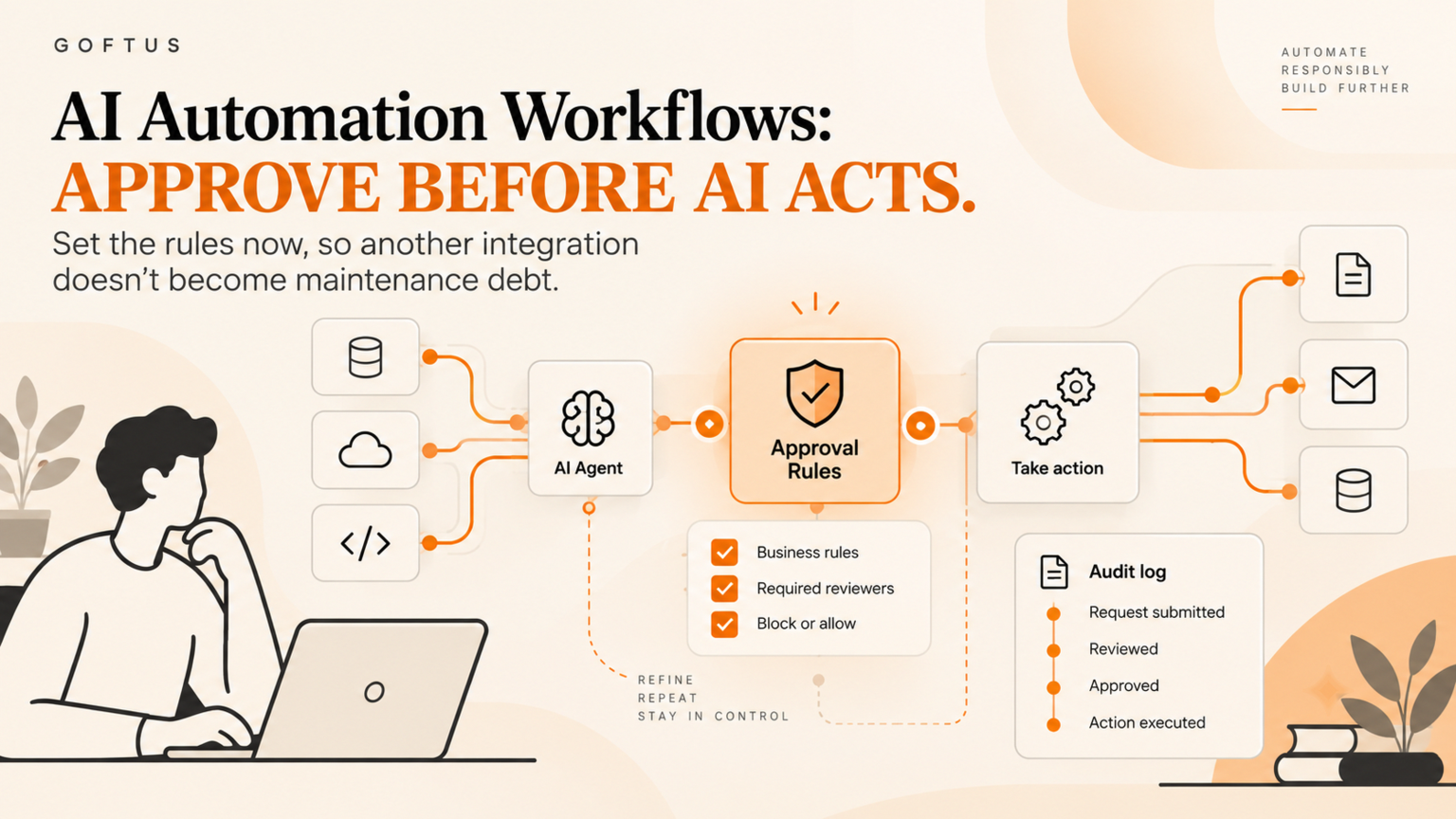
AI automation should not start with another connector. It should start with a clear workflow owner, approval rules, audit logs, and a maintenance plan for what happens when the system changes. For founders and operators, the risk is not only a broken integration. The larger risk is a quiet chain of AI assisted actions that nobody owns, reviews, or improves.
Quick answer
AI automation works best when every integration has a named owner, a defined action boundary, a human approval path for risky steps, and an audit trail that shows what happened. Before an SME adds another SaaS connector, agent, or automation tool, it should map the workflow from request to result, decide which actions stay read-only, and record who approves exceptions.
That is the difference between useful workflow automation and maintenance debt. One creates a repeatable operating system. The other creates a fragile stack of triggers, copied fields, and hidden dependencies.
What is AI automation maintenance debt?
AI automation maintenance debt is the backlog of unclear owners, brittle integrations, stale prompts, unused triggers, missing logs, and undocumented handoffs that builds up when a business automates work faster than it governs the workflow.
It usually starts innocently. A team connects a form to a CRM. Then a support inbox gets an AI reply draft. Then a reporting bot updates a spreadsheet. Then a browser agent checks a vendor portal. Each step looks useful on its own, but nobody has written down the full path from input to decision to action.
Security guidance from OWASP now treats agentic skills as an execution layer that can give AI agents real operational impact, not just text output. OWASP's checklist calls for permission review, isolation, monitoring, approval workflows, and comprehensive audit logging for agent actions. That is a practical warning for SMEs: if the agent or automation can act, the business needs a control path around the action.
What this means for SMEs
For an SME, the best AI automation project is rarely the flashiest one. It is the workflow that repeats often, wastes staff time, and already has a human decision pattern.
The goal is not to make the AI fully autonomous on day one. The goal is to create controlled lanes:
Read-only lane: AI gathers, classifies, summarizes, or prepares work.
Draft lane: AI proposes a response, update, record, or next step.
Approval lane: a person approves customer-facing, financial, legal, HR, or admin actions.
Action lane: the automation performs the approved step and logs the result.
Review lane: the team checks exceptions, errors, cost, and outcomes.
Practical workflow example
Imagine a service business that wants AI automation for inbound leads. The weak version is simple: form submission enters the CRM, AI scores the lead, and an email goes out automatically. It looks efficient, but it may route the wrong lead, promise the wrong service, or hide why a high-value enquiry was missed.
A governed version is different. The form submission enters the CRM. AI enriches the company, summarizes the need, checks whether the message matches the ideal customer profile, and drafts a reply. The sales owner sees the recommendation inside a queue. If the lead is low risk, the system can create a task and send a standard acknowledgement. If the lead mentions budget, urgency, personal data, or unusual requirements, the workflow asks for approval before sending anything.
The audit log should show the original request, fields used, AI recommendation, human approval, final message, CRM update, and follow-up date. That makes the workflow measurable and defensible. It also makes improvement easier because the team can see where leads slow down, which cases need manual judgement, and where automation is safe to expand.
For a first pass, review the GOFTUS services page at /services and the AI agent workflow options at /agents, then use /contact to book a workflow diagnostic. The diagnostic should identify one repeatable workflow, not a wish list of disconnected tools.
Approval checklist before you connect another AI tool
Use this checklist before adding the next AI automation or integration:
Name the workflow owner who is accountable for the result.
Write the business outcome in one sentence.
List every system the automation can read from or write to.
Separate read-only actions from actions that change records, send messages, or spend money.
Decide which steps need human approval.
Define stop rules for missing data, unusual requests, high-value accounts, complaints, and policy conflicts.
Log inputs, recommendations, approvals, final actions, and errors.
Competitor lens
Zapier, Make, n8n, CRM add-ons, and AI agent platforms can all be useful. They move data, trigger steps, and shorten manual work. The gap appears when the business treats the platform as the workflow owner.
GOFTUS sits in that gap. The offer is not another pile of connectors. It is human-approved AI automation built around one operational workflow, with boundaries, review, and measurable improvement.
Common mistakes
The first mistake is automating the noisy part instead of the valuable part. If a team automates random inbox work before defining what a qualified request looks like, it only creates faster confusion.
The second mistake is skipping approval rules because the first demo worked. Demos usually use clean examples. Real workflows include angry customers, partial data, duplicate records, broken pages, pricing exceptions, and staff overrides.
Summery for SMEs
AI automation is valuable when it removes repeatable friction without removing ownership. Before adding another integration, define the workflow, split prepare from act, add approval gates, log every important step, and review outcomes. That gives the business a foundation for safer automation, better ROI, and cleaner handoffs across sales, support, operations, and finance.
FAQ
What is AI automation in a business workflow?
AI automation in a business workflow uses AI to prepare, classify, draft, route, or complete repeatable work across business systems. The safest version keeps risky actions behind approval gates and logs what changed.
When should a business use AI automation?
Use AI automation when the workflow repeats often, has clear inputs, has a measurable outcome, and already follows a human decision pattern. Avoid full autonomy when the work involves money, legal commitments, HR, customer complaints, or unclear policy.
How can approval workflows reduce AI automation risk?
Approval workflows split preparation from action. AI can gather context and draft the next step, while a human approves sensitive actions before the system sends, changes, deletes, or submits anything.
What should an AI automation audit log include?
An audit log should include the input, data sources used, AI recommendation, human approver, final action, timestamp, exception reason, and any downstream system update.
How does GOFTUS help with AI automation?
GOFTUS designs human-approved AI automation around one real workflow at a time. The work includes workflow diagnostics, approval rules, agent boundaries, CRM or support handoffs, and improvement loops.
Source notes
OWASP Agentic Skills Top 10: https://owasp.org/www-project-agentic-skills-top-10
OWASP Agentic AI Threats and Mitigations: https://genai.owasp.org/resource/agentic-ai-threats-and-mitigations/
NIST AI Risk Management Framework: https://www.nist.gov/itl/ai-risk-management-framework