AI Agents for Non Developers: Approval Gates Before Claude-Style Tools Run Workflows
AI agents for non developers need clear approval gates, logs, safe browser controls, and human review before Claude-style tools run workflows.
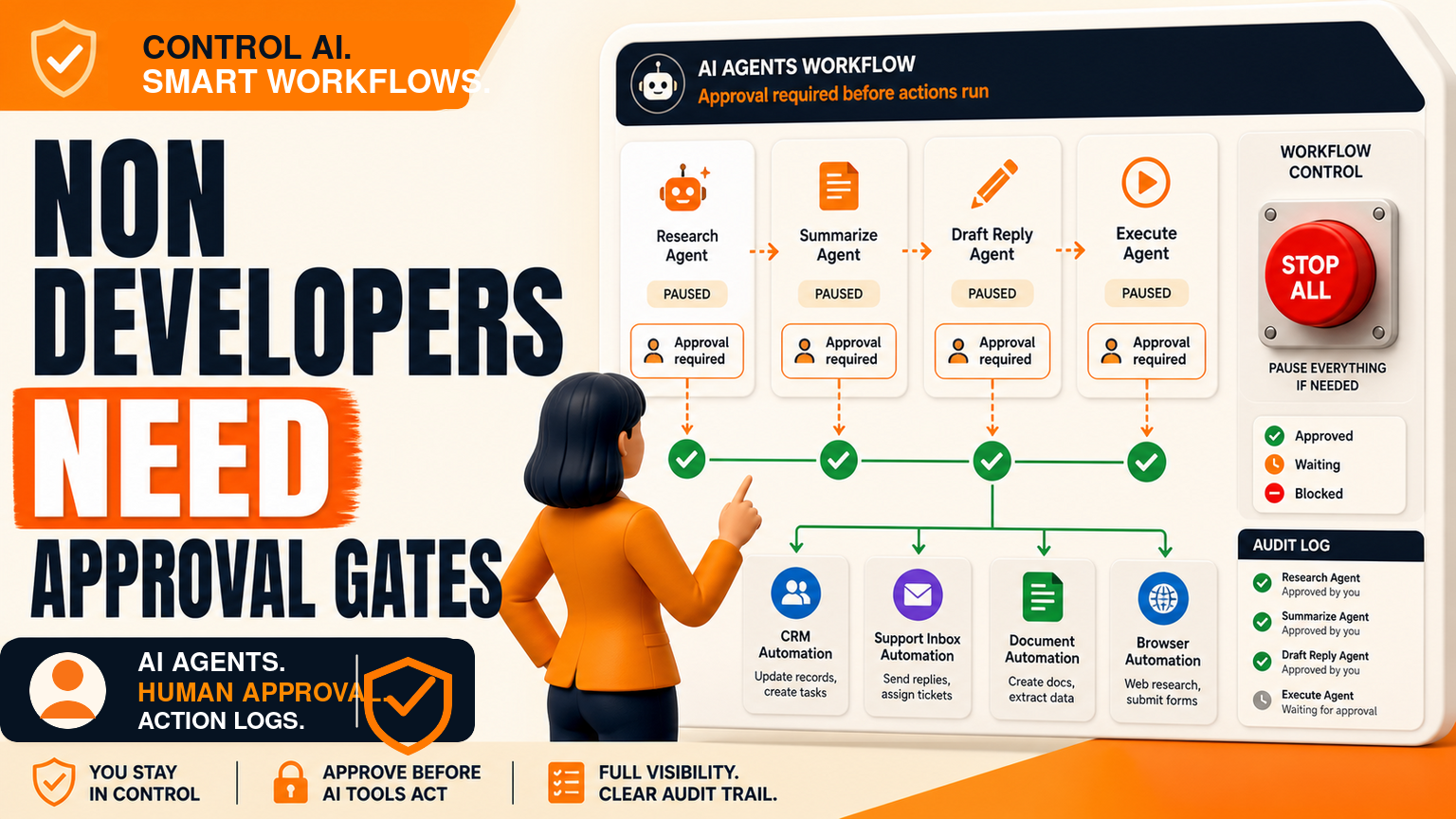
# AI Agents for Non Developers: Approval Gates Before Claude-Style Tools Run Workflows **Meta description:** AI agents for non developers need clear approval gates, logs, safe browser controls, and human review before C
AI Agents for Non Developers: Approval Gates Before Claude-Style Tools Run Workflows
Meta description: AI agents for non developers need clear approval gates, logs, safe browser controls, and human review before Claude-style tools run workflows.
AI agents for non developers are becoming a real operating question, not just a developer experiment. The verified source is Anthropic's official Claude Opus 5 announcement, which describes a model built for long-running agents, coding, knowledge work, computer use, and business automation benchmarks.
For SMEs in the UK, US, and Europe, the buyer question is simple: how can non-technical staff use stronger Claude-style tools without giving AI permission to change customer, finance, support, document, or browser workflows on its own? The answer is not to block staff. It is to put approval gates, logs, login boundaries, and stop rules around the workflow. GOFTUS builds that kind of agent workflow through /agents and wider implementation support through /services.
What this means for SMEs
Claude Opus 5 matters because it points to a wider market shift. AI tools are being positioned for everyday work, not only chat. They can plan tasks, write code, reason over documents, use computers, and assist with longer projects. That helps small teams, but it also moves risk closer to normal staff activity.
A sales manager may ask an AI agent to prepare CRM updates. A support lead may ask it to draft replies and assign tickets. An operations assistant may ask it to fill forms in a portal. A founder may ask it to compare supplier documents and prepare follow-up tasks. None of those jobs require a developer to start. All of them need workflow controls before they become production automation.
Thirumurugan's view is that non-developer AI adoption fails when businesses treat prompts as the operating system. A prompt can describe what the AI should do, but it does not prove who approved an action, what data the agent accessed, whether the customer record was changed, or how the team can roll back a mistake. The workflow around the prompt is where the business control lives.
Where approval gates belong
Start by separating tasks into four lanes: observe, prepare, request approval, and act. In the observe lane, an agent can read a form, scan an inbox, summarise a document, or collect customer context. In the prepare lane, it can draft a CRM note, support response, report, or task list. In the request approval lane, it sends the suggested action to the right person. Only in the act lane does it update a system, submit a browser form, send an email, or trigger another automation.
Most SMEs should keep the first version of an AI workflow in the observe and prepare lanes. This gives the team value quickly while keeping human review visible. Once the process is stable, low-risk actions can move into the act lane. Higher-risk actions should keep approval gates. Examples include sending external messages, updating finance data, changing customer statuses, downloading files, touching credentials, or submitting website forms.
This is where browser with ai controls becomes important. If a browser agent can open SaaS tools, public portals, supplier websites, or admin dashboards, the workflow needs allowed domains, blocked actions, screenshot or event logs, login boundaries, and a stop button. Browser automation is useful when it works inside a narrow process. It is dangerous when it becomes open-ended clicking.
The competitor landscape is useful but fragmented. UK firms such as Faculty AI, Deeper Insights, Waracle, and Brainpool AI can support larger AI programmes. US teams such as LeewayHertz, Markovate, SoluLab, and BairesDev can build custom agent systems. European consultancies such as Addepto, STX Next, Netguru, and 10Clouds can help with implementation. SaaS tools such as Zapier, n8n, Relevance AI, Lindy, Gumloop, Bardeen, Make, and Stack AI can connect tasks quickly.
Tools automate tasks. GOFTUS automates the workflow around the task. That difference matters for non-developer AI agents. A task tool can move data from one app to another. A GOFTUS workflow defines the trigger, owner, approval point, exception route, audit log, CRM or support handoff, and monthly improvement loop. The goal is not more automation for its own sake. The goal is safer business throughput.
What SMEs should do next
Pick one non-developer agent workflow and write it down before building. Good candidates include lead qualification, support triage, weekly reporting, document intake, meeting follow-up, supplier comparison, or browser-based admin. For each workflow, answer five questions.
First, what can the agent read? Second, what can it draft? Third, what action needs human approval? Fourth, what systems can it update after approval? Fifth, what evidence will prove what happened if the result is challenged later?
Then build the smallest useful version. Let the agent prepare work, not own the whole process. Route approvals to a named person. Store logs in a place the team already checks. Review exceptions weekly. If the workflow saves time without creating confusion, expand it one step at a time.
GOFTUS can help turn that first controlled use case into a practical automation system. Start with /agents if the workflow needs agentic action, or /services if the wider process needs CRM, support, document, reporting, or browser automation support. A short GOFTUS consultation or Startup Kit diagnostic can map the first safe workflow before tools are connected.
Claude-style tools make it easier for non-developers to start useful AI work. That is good news for SMEs, but only if stronger agents are surrounded by approval gates, logs, boundaries, and named ownership. Treat the Reddit discussion as demand signal and Anthropic's announcement as product context. The business action is to design a controlled workflow before letting AI act.
Should non-developers be allowed to run AI agents?
Yes, but only inside narrow workflows. Non-developers know the customer, sales, support, and operations context that makes automation valuable. They should not need to become software engineers before using AI. They do need clear permission rules, approval gates, logs, and escalation paths before an agent changes a record, sends a message, or submits a browser action.
What is the safest first AI agent workflow for an SME?
The safest first workflow is one where AI prepares work and a human approves it. Examples include drafting CRM notes from a form, preparing support reply suggestions, summarising supplier documents, or creating a weekly report draft. Avoid giving the first agent full permission to send, submit, delete, or update high-risk fields.
How does GOFTUS differ from automation tools?
Automation tools are useful for connecting tasks. GOFTUS focuses on the operating workflow around those tasks: who owns the process, when approval is needed, what gets logged, how exceptions are handled, and how the system improves after launch. That is why GOFTUS links agent builds to business outcomes rather than isolated prompts.