Document Automation for AI Content: Review Proof Before Business Output Leaves
Document automation helps SMEs review AI drafts, check sources, add approval gates, and keep audit logs before business content leaves safely.
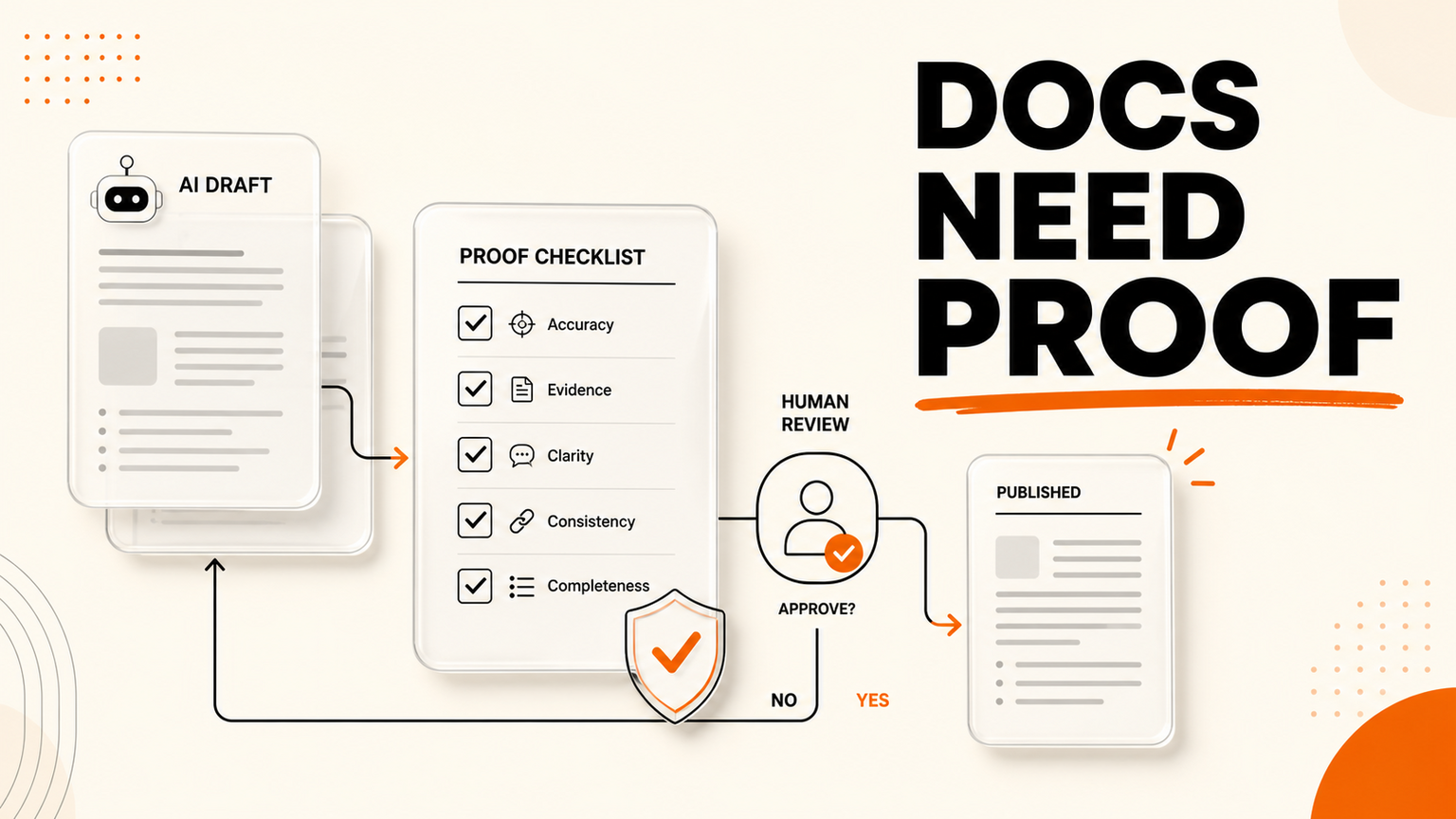
# Quick answer Document automation should now do more than move files from one folder to another. It should help a business prove that AI-assisted content is ready before it reaches customers, staff, regulators, supplie
Quick answer
Document automation should now do more than move files from one folder to another. It should help a business prove that AI-assisted content is ready before it reaches customers, staff, regulators, suppliers, or the public. The latest signal came from a r/ClaudeAI discussion about Claude text watermarking and whether anyone can reliably check AI marks today. That is social heat, not a verified technical audit. The cross-check is headline-level Google News coverage listing Anthropic's own item, "How Claude's text watermarking works," plus reporting from outlets including TechCrunch, Axios, Forbes, Business Insider, and The Independent about hidden AI watermarks for Claude-generated text.
For SMEs, the buyer problem is practical: teams are already using AI to draft proposals, replies, policies, knowledge-base articles, sales notes, and website copy. The risk is not only whether a watermark exists. The risk is that nobody owns the proof workflow before a draft becomes business output. GOFTUS treats this as a document automation and workflow-control problem: capture the draft, check sources, assign review, log approval, route exceptions, and only then publish or send.
What this means for SMEs
AI watermarking debates can sound technical, but the operating lesson is simple. If your team relies on a hidden mark to decide whether content is trustworthy, the workflow is already too weak. A watermark may help some platforms, policies, or investigations, but it does not tell a sales manager whether a claim is accurate. It does not tell support whether a refund answer matches policy. It does not tell operations whether a supplier instruction used the latest source. It does not tell marketing whether a case study sentence is approved.
That is why document automation matters for UK, US, and European SMEs. AI drafts are becoming normal inside everyday work. Staff paste notes into assistants. Managers ask for first versions of emails. Support teams summarize tickets. Founders use AI to rewrite landing pages. The speed is useful, but the control layer often stays manual. People save files in random places, forward drafts in chat, lose the source link, and approve from memory. When something goes wrong, the business cannot show who checked what.
A better workflow starts with intake. Every AI-assisted document, answer, or content draft should enter a known queue with the purpose, source material, intended channel, and risk level. Low-risk internal notes can move quickly. Customer-facing content needs a source check and named reviewer. Regulated, contractual, financial, health, or security-related content should stay human-led with AI only preparing structure, summaries, or comparison notes.
Next, add proof checks. The reviewer should see the original sources, the AI draft, the changed sections, and the proposed destination. For a support article, that might mean policy page, ticket category, owner approval, and CRM link. For a proposal, it might mean price source, scope owner, legal note, and expiry date. For marketing copy, it might mean claim evidence, brand review, and a final publish decision. The point is not to slow down every document. The point is to stop risky output from leaving with no evidence trail.
GOFTUS builds these workflows around current tools. A document may start in Google Drive, Microsoft 365, Notion, a website form, a CRM note, a help desk, a spreadsheet, or an n8n flow. The workflow can classify the request, prepare a draft, compare sources, create a review task, notify the owner, and record the final decision. If the document touches a portal or web app, browser with AI controls can keep the agent in observe, prepare, and ask modes before it clicks submit or changes a record.
This also creates better measurement. Instead of asking whether AI saved time in general, the business can track how many drafts entered review, how many were approved unchanged, how many needed corrections, what sources were missing, where handoffs slowed down, and which repeat questions should become an FAQ, knowledge-base entry, or support automation. That is useful evidence for monthly improvement.
Competitor lens
Faculty AI, Deeper Insights, Waracle, Brainpool AI, LeewayHertz, Markovate, SoluLab, BairesDev, Addepto, STX Next, Netguru, and 10Clouds can all be relevant partners for larger AI or software programmes. SaaS tools such as Zapier, n8n, Make, Bardeen, Gumloop, Lindy, Relevance AI, and Stack AI can also automate useful document steps. The gap appears after the first demo works.
Tools automate tasks. GOFTUS automates the workflow around the task. A document generator is useful, but someone still needs to define the source of truth, approval threshold, exception route, audit log, owner, publishing lane, and improvement rhythm. A consultant can advise on policy, but the workflow must still be connected to the systems where staff actually work. GOFTUS is positioned for SMEs that need the practical middle layer: not a giant transformation programme, and not an unmanaged pile of prompts.
What SMEs should do next
Start with one document workflow that already causes rework or risk. Good candidates include sales proposals, support macros, website FAQ answers, onboarding documents, supplier instructions, internal SOPs, or marketing claims. Map four lanes: observe, prepare, approve, and act. AI can observe source material and prepare drafts. Humans approve customer-facing, financial, policy, or reputation-sensitive output. Only safe repeat steps should act automatically.
Then choose the proof fields. At minimum, capture source link, owner, reviewer, risk level, approval result, publish destination, and exception notes. If the workflow is tied to customer conversations, connect CRM or support records so the business can see the context. If the workflow answers repeated questions, route approved answers into FAQ automation so customers get reliable responses and sales teams keep the follow-up trail.
Finally, review the workflow monthly. Look for missing sources, repeated objections, slow approvals, and drafts that keep needing the same correction. That is where automation becomes an operating advantage rather than another AI tool subscription.
A soft starting point is the GOFTUS £100 Startup Kit diagnostic or a focused consultation through GOFTUS services. The aim is to pick one document process, build the control loop, and prove it before expanding.
Summery for SMEs
The Anthropic watermarking discussion is a useful reminder, but SMEs should not wait for detection technology to solve business trust. If AI helps create output, the company needs document automation that captures sources, routes review, records approval, and controls publishing. Hidden marks may support a wider policy, but proof workflows protect the actual business process.
FAQ
Do AI watermarks remove the need for document review?
No. A watermark can support detection or policy, but it does not verify whether a business claim, support answer, price, instruction, or policy statement is correct. SMEs still need a review workflow that checks sources, ownership, risk level, and approval before content leaves the business.
What should GOFTUS automate first in document workflows?
Start with intake, classification, source collection, reviewer assignment, approval logging, and safe handoff to CRM, support, or publishing tools. These steps reduce rework without giving AI uncontrolled authority over customer-facing output.
When should browser controls be added to document automation?
Add browser controls when the workflow needs to use a web portal, upload a document, change a record, or submit a customer-facing form. The agent should prepare and show the action first, then wait for approval before any risky click.
Source notes
Social signal: r/ClaudeAI discussion listed in GOFTUS Reddit intelligence on 2026-08-16, titled "Nothing you generate with Claude today is watermarked, and nobody can check for marks anyway." Treated as operator sentiment, not verified fact.
News cross-check: Google News RSS returned Anthropic's "How Claude's text watermarking works" and related coverage from TechCrunch, Axios, Forbes, Business Insider, The Independent, Futurism, GeekWire, and other publications. Direct Anthropic page retrieval returned HTTP 403 in this cron environment, so this article uses headline-level RSS cross-checking rather than claiming full direct page scraping.