Browser With AI Controls for SMEs: Approve Web Actions Before AI Clicks
Browser with AI controls helps SMEs approve web actions, protect logins, and keep AI agents inside safe CRM and support workflows.
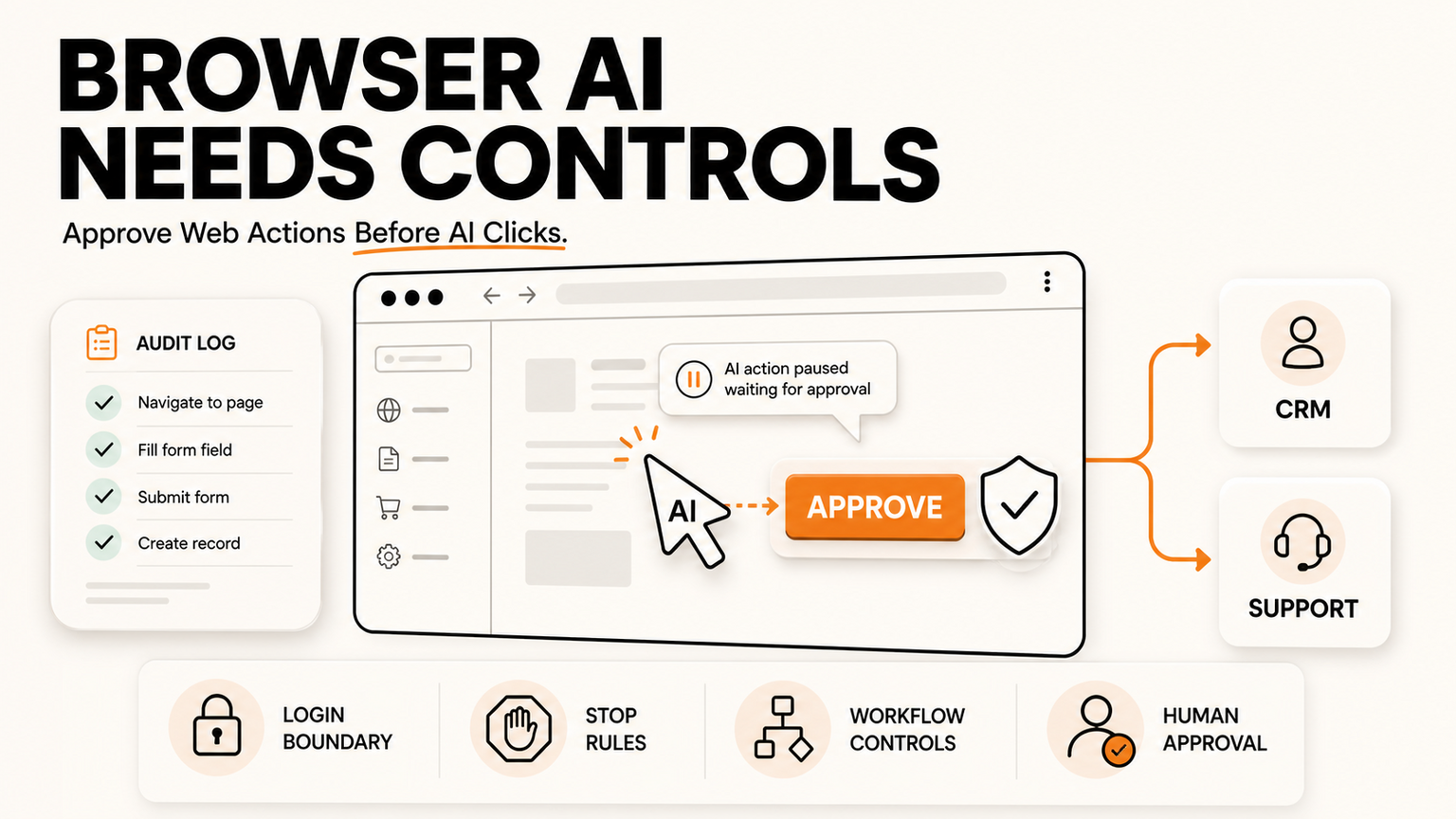
# Quick answer Browser with AI controls is the practical way for SMEs to let AI help with web work without letting it freely click through customer, finance, supplier, or support systems. The fresh signal for this run i
Quick answer
Browser with AI controls is the practical way for SMEs to let AI help with web work without letting it freely click through customer, finance, supplier, or support systems. The fresh signal for this run is a 100-score r/ChatGPT discussion asking what people use ChatGPT for that sounds ridiculous until others try it. Reddit is social heat, not verified fact. It shows operator curiosity about turning AI from chat into work. The news cross-check is stronger: Cloudflare has introduced Kitesurf, an agent-first browser for AI agents, and AWS has published guidance on using Chrome enterprise policies to restrict where AI agents can browse.
For UK, US, and EU SMEs, the buyer problem is not whether browser agents are impressive. The problem is whether they can be safely used in real workflows. A browser AI agent might open portals, fill forms, read order pages, prepare support responses, download documents, or update CRM fields. GOFTUS treats that as workflow automation with approval gates, not as a magic browser. If your team wants agents that can work around web tools, start with /agents and design the controls before the first live action.
What this means for SMEs
Most small businesses still run important processes inside browser tabs. CRM, email, booking tools, accounting portals, supplier dashboards, helpdesks, analytics, and government forms are often web-first. That is why browser-based workflow automation is attractive. It can help where APIs are missing, where legacy tools are awkward, or where staff repeat the same web task every day.
The risk is that a browser is also where many irreversible actions happen. A click can submit a form, send a message, change an order, expose personal data, download a file, or approve a payment. Cloudflare's Kitesurf announcement matters because it treats the browser as infrastructure for agents. AWS's Chrome enterprise policy guidance matters because it shows the control layer: restrict domains, manage browser behaviour, record sessions, and prevent agents from wandering outside approved paths.
An SME does not need enterprise jargon to use this idea. The first question is simple: what should the AI observe, what may it prepare, what requires human approval, and what must never happen automatically? That four-lane model turns a risky browser bot into a governed workflow.
Bharatvaj's view
My view is that browser AI will become useful fastest in boring operational work. The best early uses are not open-ended agents browsing the internet. They are narrow workflows such as checking supplier stock, preparing CRM updates, collecting invoice data, comparing portal statuses, drafting support replies from a helpdesk page, or preparing a form for a human to review.
The approval step is the difference between automation and chaos. In a GOFTUS build, the AI can collect context, fill a draft, recommend the next action, and show a reason. A person approves before the system submits, changes customer data, sends an email, downloads sensitive files, or touches finance. The log then records who approved, what the AI prepared, where the browser went, and what changed after approval.
This matters because browser automation often starts informally. A staff member discovers a prompt, extension, or no-code agent and tries it on a live process. That can save time, but it can also create shadow automation with no owner, no login rules, and no rollback plan. Browser with AI controls means the business keeps the speed while removing the guesswork.
What SMEs should do next
Start by choosing one browser task with clear boundaries. Good candidates are repetitive, low-risk, and easy to review: checking order status, preparing a customer follow-up, collecting data from a supplier portal, or drafting a support note. Avoid payments, legal submissions, password changes, bulk customer messages, or regulator portals until the workflow has proven controls.
Next, define login boundaries. The AI should not share passwords, store credentials in random tools, or access accounts that are broader than the task. Use role-based accounts where possible. Limit the agent to allowed domains. Block downloads unless required. Decide whether the browser session can keep cookies, whether screenshots are stored, and who can inspect the audit trail.
Then build the approval workflow. The agent should show the proposed action in plain language. It should include the source page, the fields it plans to change, any uncertainty, and a stop option. For higher-risk actions, require a second approval or route the task to a named owner. This is where GOFTUS connects browser agents to CRM, support, documents, reporting, and escalation queues through /services and /agents.
Finally, measure the boring things. How many tasks reached approval? How many were rejected? Which websites created exceptions? Which prompts caused unclear outputs? Which tasks saved time without increasing risk? These answers turn AI controlled browser automation into a managed process rather than an experiment.
Competitor lens
Tools automate tasks. GOFTUS automates the workflow around the task.
SaaS tools such as Zapier, n8n, Make, Bardeen, Gumloop, Lindy, Relevance AI, and Stack AI can be useful for connecting apps and building agent flows. Consulting teams such as Faculty AI, Deeper Insights, Waracle, Brainpool AI, LeewayHertz, Markovate, SoluLab, BairesDev, Addepto, STX Next, Netguru, and 10Clouds can also help companies explore AI delivery.
The missing layer for many SMEs is ownership around the action. Who decides when a browser agent can act? Which customer records are safe? What happens when a website changes? Who reviews exceptions? How are approvals logged? GOFTUS counter-positions around those workflow questions. The tool is only one part of the system. The operating model, approvals, monitoring, and monthly improvement cycle are what make it safe enough for a real business.
Summery for SMEs
Browser AI agents are moving from demos toward useful work. The safe SME pattern is not full autonomy. It is observe, prepare, approve, and act inside narrow workflows. Use browser with AI controls when web portals matter but APIs are limited. Set allowed sites, protect logins, require approval for risky actions, log every change, and review exceptions monthly. If you want to test this without creating shadow automation, GOFTUS can map the first workflow through /agents or scope a wider automation plan through /services.
FAQ
What is browser with AI controls?
Browser with AI controls means an AI agent can help inside web pages while the business sets boundaries around where it can go, what it can prepare, and what needs human approval. It is useful when important work happens in portals, dashboards, or web tools that do not have clean APIs.
Which browser actions should require approval?
Submitting forms, sending messages, changing CRM data, downloading sensitive documents, updating orders, approving payments, and changing account settings should require approval. The AI can prepare those actions, but a person should confirm the final step.
How can GOFTUS help with browser-based workflow automation?
GOFTUS designs the workflow around the browser task: scope, login rules, allowed domains, approval gates, logs, exception routing, and improvement reviews. The goal is to let AI prepare useful work while people stay in control of risky actions.
Source notes
Sources used: 100-score r/ChatGPT social signal from the GOFTUS Reddit intelligence run on 2026-08-16, Cloudflare's Kitesurf announcement about an agent-first browser, AWS guidance on Chrome enterprise policies for Amazon Bedrock AgentCore Browser, and Google News RSS results for browser AI controls. Reddit is treated as social sentiment only. The Cloudflare and AWS sources are used as the technical/news cross-checks.