AI Agents for Non-Developers: Approval Gates Before Browser and Computer Actions
AI agents for non-developers need approval gates, browser controls, audit logs, and human review before touching CRM or customer workflows safely.
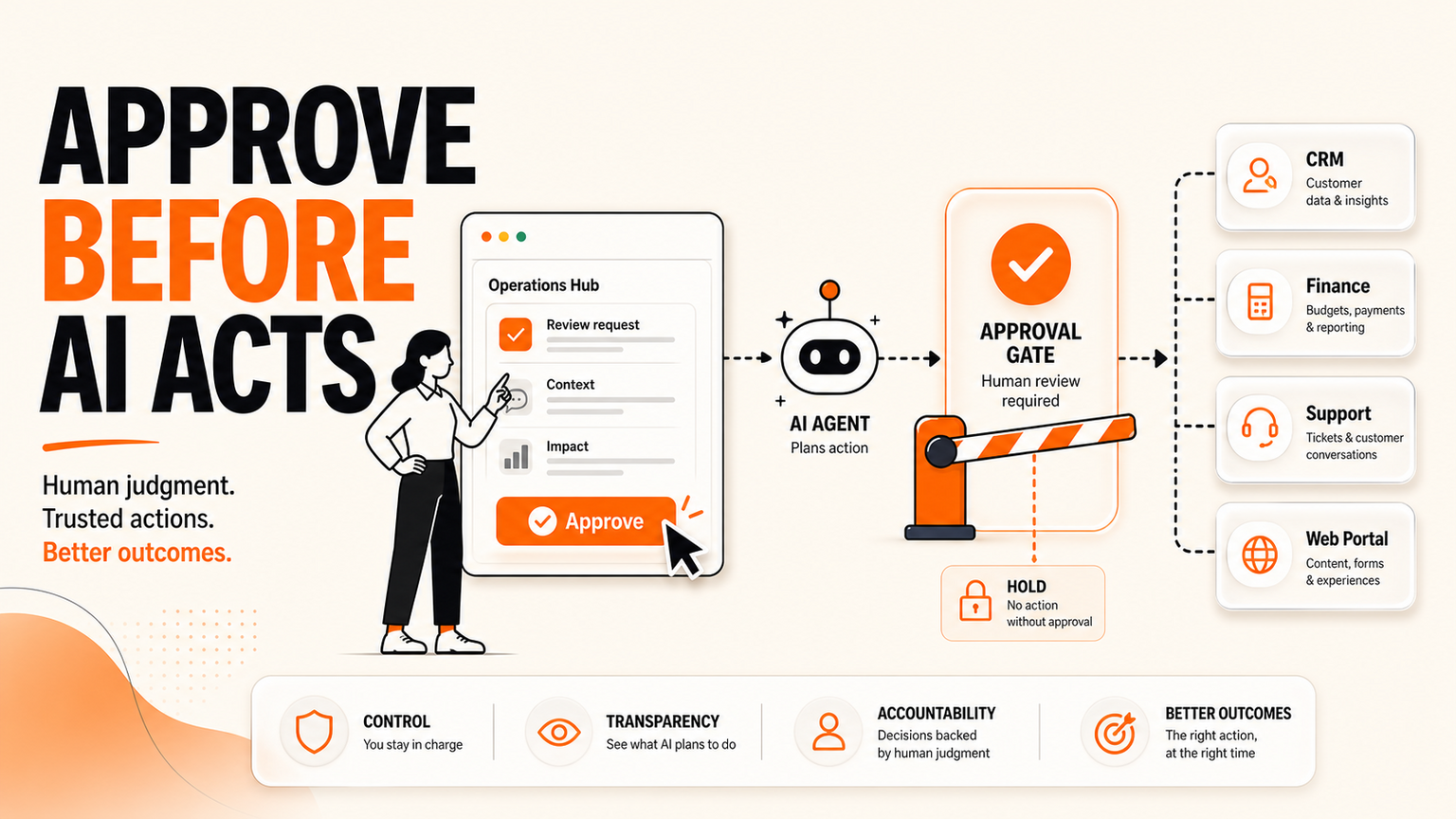
# Quick answer AI agents for non-developers are becoming a real SME workflow issue because the next generation of tools can control browsers, desktops, files, and business apps with far less technical setup. The source
Quick answer
AI agents for non-developers are becoming a real SME workflow issue because the next generation of tools can control browsers, desktops, files, and business apps with far less technical setup. The source signal for this post is a 100-score r/ClaudeAI item in the GOFTUS Reddit intelligence run about people building Claude-powered computer-control clones. Reddit is social heat, not verified product evidence. Google News RSS also showed current coverage from Engadget, The Verge, CNET, DevOps.com, ZDNET, and others around Claude Code, Cowork, and computer-use capabilities.
The buyer problem is not whether Claude, OpenAI, Perplexity, or another model can click a button. The buyer problem is whether a small team can let AI prepare browser and computer actions without accidentally changing CRM records, sending customer messages, moving money, downloading files, or submitting forms too early. GOFTUS would start with AI agent workflow design and /services, then decide what the agent can observe, prepare, approve, and act on.
What this means for SMEs
For UK, US, and European SMEs, AI agents for non-developers sound attractive because they promise speed without a large engineering team. A sales manager can ask an agent to research a lead. A support lead can ask it to check a portal. An operations owner can ask it to reconcile a form, update a spreadsheet, or draft a reply. That is useful, but it changes the risk profile. When the agent moves from chat into a browser or desktop, the business is no longer only reviewing text. It is reviewing possible actions.
That is why the workflow must separate planning from doing. In the first lane, the agent observes. It can read a page, summarise a ticket, check a dashboard, or identify the next step. In the second lane, it prepares. It can draft the CRM update, suggest the response, populate a form, or create a task. In the third lane, a human approves. Only after that should a narrow, reversible, logged action happen.
This is where the exact query browser with ai controls fits GOFTUS positioning. Browser-based workflow automation should include allowed domains, login boundaries, stop rules, screenshots or logs, action previews, and a human review point before submit, send, pay, delete, refund, or update. Without those controls, non-developers can accidentally create shadow IT. With controls, they can safely turn repeated admin into a visible workflow.
Bharatvaj's view
Bharatvaj's view is that non-developer AI agents should be treated like new staff members with restricted permissions, not magic shortcuts. You would not give a new assistant unlimited access to CRM, finance, support, contracts, browser portals, and customer inboxes on the first day. You would explain the process, show examples, require approval for risky actions, and review mistakes. AI agents need the same operating model.
The useful first project is usually narrow. Choose one browser or desktop workflow that happens every week. It might be checking support portal status, drafting follow-up notes after a lead form, comparing an invoice to a purchase order, preparing a CRM update, or collecting data from an approved supplier portal. Define the exact start trigger, inputs, system of record, human owner, allowed action, blocked action, and exception route.
Then test with real messy examples. Does the agent stop when a login page changes? Does it ask before submitting a form? Does it show what it plans to update? Can staff see what source it used? Does it keep a log when it fails? If the answer is no, keep the agent in observe or prepare mode until the workflow is safer.
Competitor lens
UK consultancies such as Faculty AI, Deeper Insights, Waracle, and Brainpool AI can help with AI strategy, data work, or digital delivery. US providers such as LeewayHertz, Markovate, SoluLab, and BairesDev can build custom systems. European teams such as Addepto, STX Next, Netguru, and 10Clouds can support software and data projects. SaaS tools such as Zapier, n8n, Relevance AI, Lindy, Gumloop, Bardeen, Make, and Stack AI can move tasks quickly across apps.
Those options can be useful. The gap is the workflow around the task. Tools automate tasks. GOFTUS automates the workflow around the task. For AI agents for non-developers, that means action boundaries, human approvals, login rules, audit logs, CRM or support handoff, exception queues, and monthly improvement. A tool can click. GOFTUS helps decide when clicking is allowed, who owns the outcome, and how the business learns from every exception.
What SMEs should do next
Start by listing the browser and computer actions staff repeat but hesitate to outsource. Mark each action green, amber, or red. Green means the agent can prepare or act after light review because the action is low risk and reversible. Amber means the agent can prepare the action, but a human must approve before anything changes. Red means the agent can only collect context or draft a recommendation because the action affects money, legal commitments, sensitive customer data, security, or public communication.
Next, connect the agent to one service path. If the workflow involves business process design, start at /services. If it involves agents that act across tools or browser sessions, start at /agents. If the work touches customer follow-up or repeated questions, connect it to /questions or FAQ automation later. Do not connect every system at once. Build one reliable approval loop, then expand.
The practical GOFTUS route is a short diagnostic, often linked to the £100 Startup Kit, where the team maps the current workflow, risk level, data sources, approval gates, and first measurable outcome. The result is not an abstract AI transformation plan. It is a controlled operating workflow for one repeated action.
Summery for SMEs
The fresh signal is that operators are experimenting with Claude-style computer control and AI agents that can use browsers and desktops. The news cross-check shows the same direction in mainstream AI coverage. The SME lesson is simple: non-developers can benefit from AI agents, but only if the business controls what those agents are allowed to do.
Use observe, prepare, approve, and act lanes. Keep browser with ai controls in place for web portals. Log every action. Require human review for CRM, finance, support, document, and customer-facing changes. Then GOFTUS can help turn promising agent demos into safe business workflows through /agents and /services.
FAQ
Should non-developers use AI agents at work?
Yes, but start with controlled workflows. Non-developers should use agents to observe, draft, prepare, and route work before the agent is allowed to complete real business actions.
What are browser with AI controls?
Browser with AI controls means the agent can use web pages inside boundaries: approved domains, login rules, action previews, stop rules, audit logs, and human approval before submit or update.
Where should an SME start?
Start with one repeated browser or desktop task, define the owner and approval rule, then ask GOFTUS to connect it safely through /agents or /services.
Source notes: Social signal from the GOFTUS Composio Reddit intelligence run on 2026-08-15, especially r/ClaudeAI discussion about building a Claude-powered clone to control a computer. Reddit is treated as operator sentiment and experimentation, not as verified product performance. Google News RSS cross-checks for Claude computer control surfaced Engadget, The Verge, CNET, DevOps.com, ZDNET, Thurrott, AppleInsider, and related items. These are used as headline-level context where direct article access was not required for claims. X was unavailable because xurl had no registered app in this cron environment.